Reviews
Your graphics add a nice touch to my presentations and I recently used them for one of my all-hands meetings. Your toolbox adds professionalism to my slides. Instead of using standard clipart.
I needed a fresh look at some of my slides. I've tried to find a way to create a paintbrush effect, to underline, accentuate, add some color and the handwritten markers were just the things. Very easy to use, easy to size, change the color. It was an affordable, perfect solution and I'm happy to recommend it.
The crisp, clean look of the graphics, and the fact that it allowed me to easily edit and change the colors to match the template was my main reason for purchasing them.
Description
NIST Cybersecurity Framework Stages Example
Slide Content
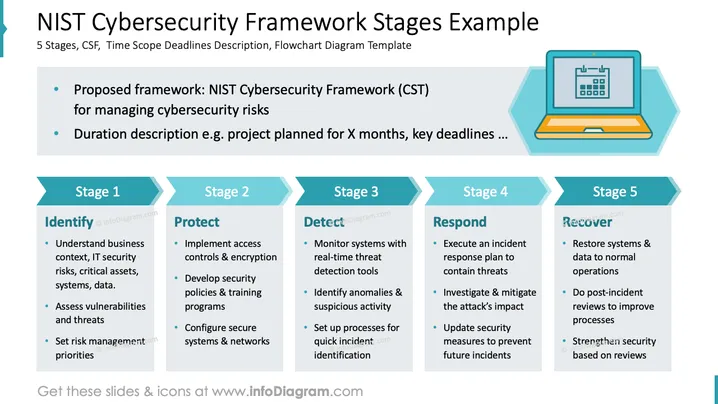
The slide discusses the NIST Cybersecurity Framework through its five essential stages for managing cybersecurity risks. These are:
- Identify: Understand the business context, IT security risks, critical assets, systems, and data; assess vulnerabilities and threats; set risk management priorities.
- Protect: Implement access controls and encryption, develop security policies and training programs, configure secure systems and networks.
- Detect: Monitor systems with real-time threat detection tools, identify anomalies and suspicious activity, set up processes for quick incident identification.
- Respond: Execute an incident response plan to contain threats, investigate and mitigate attack impacts, update security measures to prevent future incidents.
- Recover: Restore systems and data to normal operations, conduct post-incident reviews, strengthen security based on reviews.
Graphical Look
- The slide uses a clean layout with a large title at the top.
- Underneath the title, there's a description box with two bullet points shaded in a light gray background.
- The five stages are presented in rectangular columns with teal-colored stage headers.
- Each column includes a brief title and a detailed list of actions or considerations.
- There is a laptop with a calendar icon on the right side, depicting planning and scheduling.
The overall look is professional and organized. The use of teal and gray provides a modern aesthetic, and the icons add clarity to the complex information.
Use Cases
- Presenting cybersecurity strategies in business meetings.
- Educating IT teams about risk management frameworks.
- Discussing cybersecurity measures with stakeholders.
- Planning project timelines based on NIST guidelines.
How to Edit
How to edit text & colors

How to expand / shorten diagram

How to Replace Icons in infoDiagram PPT


