

Your graphics add a nice touch to my presentations and I recently used them for one of my all-hands meetings. Your toolbox adds professionalism to my slides. Instead of using standard clipart.
Claude Jones, Director of Engineer, @Walmartlabs, USA

Your graphics add a nice touch to my presentations and I recently used them for one of my all-hands meetings. Your toolbox adds professionalism to my slides. Instead of using standard clipart.
Claude Jones, Director of Engineer, @Walmartlabs, USA
I needed a fresh look at some of my slides. I've tried to find a way to create a paintbrush effect, to underline, accentuate, add some color and the handwritten markers were just the things. Very easy to use, easy to size, change the color. It was an affordable, perfect solution and I'm happy to recommend it.
Anonymous, US
The crisp, clean look of the graphics, and the fact that it allowed me to easily edit and change the colors to match the template was my main reason for purchasing them.
Brandie Jenkins, E-learning Developer, USA
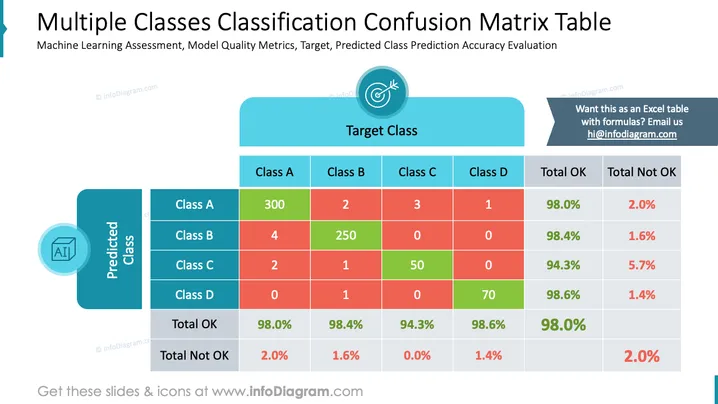
This PowerPoint slide presents a confusion matrix for evaluating the performance of a machine learning classification model across multiple classes (A, B, C, D). It includes predictions vs. expected target class results, with correct predictions highlighted in green and incorrect ones in red. Percentages of correct (Total OK) and incorrect (Total Not OK) predictions are shown for each class. The confusion matrix is structured to indicate how often the model correctly or incorrectly predicts a class, which is key for understanding its accuracy.
The slide combines a mix of text, colors, and graphical elements to present data in a clear and visually distinguishable manner. The contrast between green and red instantly communicates correct and incorrect predictions, which helps quickly assess the model's performance.



