Reviews
Your graphics add a nice touch to my presentations and I recently used them for one of my all-hands meetings. Your toolbox adds professionalism to my slides. Instead of using standard clipart.
I needed a fresh look at some of my slides. I've tried to find a way to create a paintbrush effect, to underline, accentuate, add some color and the handwritten markers were just the things. Very easy to use, easy to size, change the color. It was an affordable, perfect solution and I'm happy to recommend it.
The crisp, clean look of the graphics, and the fact that it allowed me to easily edit and change the colors to match the template was my main reason for purchasing them.
Description
Monitoring and Reporting Actions
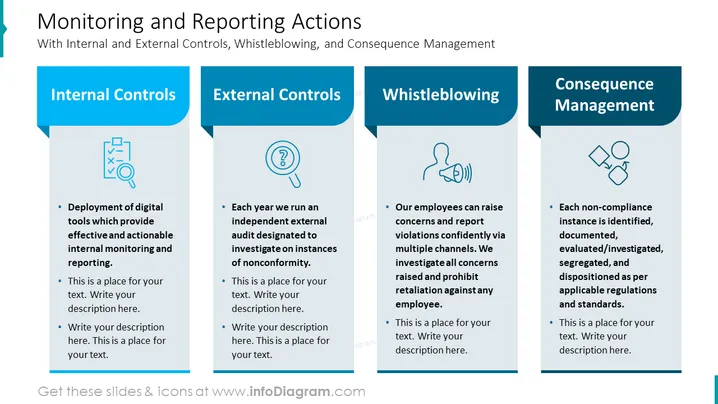
Slide Content: The PowerPoint slide is about "Monitoring and Reporting Actions" with a focus on four main areas: Internal Controls, which involve the deployment of digital tools for effective monitoring and reporting; External Controls, where an independent external audit is conducted annually to investigate nonconformity; Whistleblowing, which enables employees to confidentially report concerns and prohibits retaliation; and Consequence Management, where non-compliance instances are identified, documented, and handled according to regulations and standards.
Graphical Look:
- The title "Monitoring and Reporting Actions" is prominently displayed at the top of the slide in large, bold text.
- Below the title is a subtitle "With Internal and External Controls, Whistleblowing, and Consequence Management."
- Four content sections are arranged horizontally across the slide, each with a distinct icon and colored header.
- The first section has a blue header with the text "Internal Controls," along with an icon depicting a clipboard and checklist.
- The second section has a blue header with the text "External Controls," along with an icon showing a magnifying glass and a document with a question mark.
- The third section has a blue header with the text "Whistleblowing," accompanied by an icon with a person silhouette and sound waves.
- The fourth section has a blue header with the text "Consequence Management," with an icon illustrating two mismatched puzzle pieces and a checkmark.
- Each section includes bullet points for additional text, with some placeholder text included.
The overall look of the slide is clean and professionally designed, with a consistent color scheme and clear visual distinction between the different sections. The icons are simple and related to the content they represent.
Use Cases:
- To present a company's compliance framework during a board meeting or to stakeholders.
- In a training session for employees to explain the processes and importance of internal monitoring and compliance.
- During an internal audit meeting to discuss the methods of monitoring and reporting actions within the company.
- As part of a risk management presentation, illustrating the control measures and response strategies the company employs.
How to Edit
How to edit text & colors

How to expand / shorten diagram

How to Replace Icons in infoDiagram PPT


