Reviews
Your graphics add a nice touch to my presentations and I recently used them for one of my all-hands meetings. Your toolbox adds professionalism to my slides. Instead of using standard clipart.
I needed a fresh look at some of my slides. I've tried to find a way to create a paintbrush effect, to underline, accentuate, add some color and the handwritten markers were just the things. Very easy to use, easy to size, change the color. It was an affordable, perfect solution and I'm happy to recommend it.
The crisp, clean look of the graphics, and the fact that it allowed me to easily edit and change the colors to match the template was my main reason for purchasing them.
Description
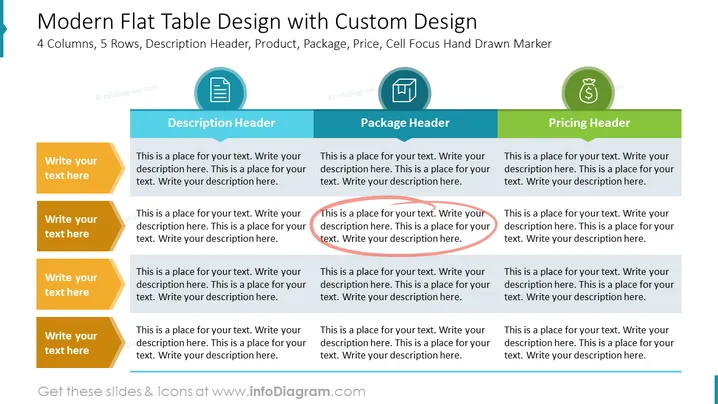
Modern Flat Table Design with Custom Design
Slide Content
The slide titled "Modern Flat Table Design with Custom Design" appears to outline a matrix or table format with 4 columns, each designated for a specific aspect: Description, Package, and Pricing, with each header highlighted in a unique color. The "Description Header" likely suggests an area where detailed information about a product or feature can be elaborated. The "Package Header" implies a section to discuss different package options, while the "Pricing Header" clearly indicates a place to list prices. The fifth row, designated by "Cell Focus Hand Drawn Marker," suggests an emphasis or highlighting of key elements in the table—indicating that this area could be used to draw attention to important details or offers.
Graphical Look
- The title of the slide uses bold, dark blue text, making it prominent.
- Three headers labeled "Description Header," "Package Header," and "Pricing Header" are in rectangular banners shaded with light blue, green, and dark blue color bars, respectively.
- Beneath each header, there are four text boxes with directional shapes pointing towards the headers, suggesting a categorization under each topic.
- The text boxes are filled in with different shades of yellow and are labeled with "Write your text here," prompting users to input their information.
- Each header has an associated icon: a document icon for the "Description Header," a box icon for the "Package Header," and a money bag for the "Pricing Header," each encircled and colored to match the header's theme.
- The overall color scheme is a mix of blue, green, yellow, and gray tones, with a touch of red highlighting on a single text box, drawing attention to it.
The slide has a clean, professional design with a clear hierarchy established through the use of color and shapes. It presents information in an organized manner, utilizing icons to visually support the textual content.
Use Cases
- To compare product features, packages, and pricing options during a business strategy meeting or sales pitch.
- To present a marketing plan, illustrating different campaigns or content strategies across various platforms.
- To showcase service tiers, detailing what each level of service includes during a customer onboarding or service introduction.
- To provide an overview of software subscription models, comparing the benefits and costs of each during investor presentations or customer briefings.
How to Edit
How to edit text & colors

How to expand / shorten diagram

How to Replace Icons in infoDiagram PPT


