

Your graphics add a nice touch to my presentations and I recently used them for one of my all-hands meetings. Your toolbox adds professionalism to my slides. Instead of using standard clipart.
Claude Jones, Director of Engineer, @Walmartlabs, USA

Your graphics add a nice touch to my presentations and I recently used them for one of my all-hands meetings. Your toolbox adds professionalism to my slides. Instead of using standard clipart.
Claude Jones, Director of Engineer, @Walmartlabs, USA
I needed a fresh look at some of my slides. I've tried to find a way to create a paintbrush effect, to underline, accentuate, add some color and the handwritten markers were just the things. Very easy to use, easy to size, change the color. It was an affordable, perfect solution and I'm happy to recommend it.
Anonymous, US
The crisp, clean look of the graphics, and the fact that it allowed me to easily edit and change the colors to match the template was my main reason for purchasing them.
Brandie Jenkins, E-learning Developer, USA
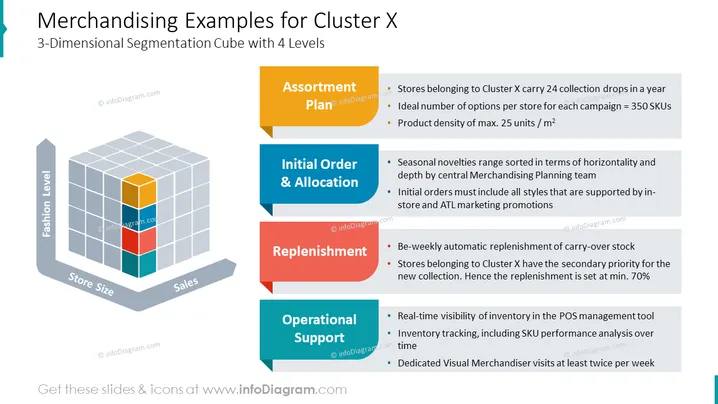
3-Dimensional Segmentation Cube with 4 Levels
The PowerPoint slide outlines merchandising strategies for stores in a specific group called Cluster X, structured around a 3-Dimensional Segmentation Cube with 4 levels. The slide breaks down these strategies into four categories: Assortment Plan, Initial Order & Allocation, Replenishment, and Operational Support. For Assortment Plan, this means stores in Cluster X offer a robust variety of items, having 24 collection drops annually and maintaining a product density consistent with space optimization. Initial Order & Allocation suggests strategic inventory planning by central teams, ensuring product availability aligned with marketing efforts. Replenishment focuses on maintaining stock levels through automatic bi-weekly processes and prioritizes Cluster X for new collections at a minimum rate. Operational Support is about maintaining inventory oversight and providing regular visual merchandiser visits to ensure display quality.
The slide has a clean, professional design with a 3D cube as the focal point correlating to the color-coded categories on the right. The use of space and color creates an organized presentation of complex information.



