

Your graphics add a nice touch to my presentations and I recently used them for one of my all-hands meetings. Your toolbox adds professionalism to my slides. Instead of using standard clipart.
Claude Jones, Director of Engineer, @Walmartlabs, USA

Your graphics add a nice touch to my presentations and I recently used them for one of my all-hands meetings. Your toolbox adds professionalism to my slides. Instead of using standard clipart.
Claude Jones, Director of Engineer, @Walmartlabs, USA
I needed a fresh look at some of my slides. I've tried to find a way to create a paintbrush effect, to underline, accentuate, add some color and the handwritten markers were just the things. Very easy to use, easy to size, change the color. It was an affordable, perfect solution and I'm happy to recommend it.
Anonymous, US
The crisp, clean look of the graphics, and the fact that it allowed me to easily edit and change the colors to match the template was my main reason for purchasing them.
Brandie Jenkins, E-learning Developer, USA
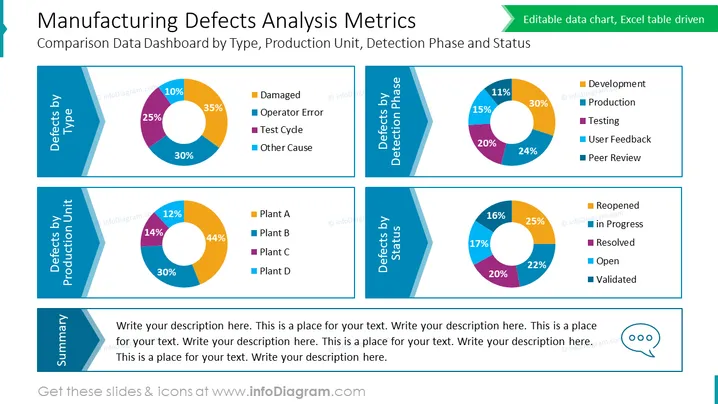
The slide titled "Manufacturing Defects Analysis Metrics" presents a comparison data dashboard focusing on defect type, production unit, detection phase, and status. Each category is represented by a donut chart displaying percentages. "Defects by Type" shows Damage, Operator Error, Test Cycle, and Other Causes. "Defects by Production Unit" breaks down into Plants A, B, C, and D. "Defects by Detection Phase" lists Development, Production, Testing, User Feedback, and Peer Review. Lastly, "Defects by Status" includes categories such as Reopened, in Progress, Resolved, Open, and Validated. Each chart gives a visual representation of the proportion of defects in each category, thereby allowing for a quick assessment of defect distribution across different aspects of the manufacturing process.
The slide has a clean and professional appearance with a structured layout that prioritizes clear communication of data. The ### Use Cases



