Reviews
Sus gráficos añaden un toque agradable a mis presentaciones y recientemente los usé para una de mis reuniones generales. Su conjunto de herramientas añade profesionalismo a mis diapositivas. En lugar de usar imágenes prediseñadas estándar.
Necesitaba un aspecto fresco para algunas de mis diapositivas. Había intentado encontrar una forma de crear un efecto de pincel, de subrayar, acentuar, añadir algo de color y los marcadores escritos a mano fueron justo lo que necesitaba. Muy fácil de usar, fácil de ajustar el tamaño, cambiar el color. Fue una solución asequible y perfecta, y estoy feliz de recomendarla.
El aspecto nítido y limpio de los gráficos, y el hecho de que me permitiera editar y cambiar fácilmente los colores para que coincidieran con la plantilla fue mi principal razón para comprarlos.
Description
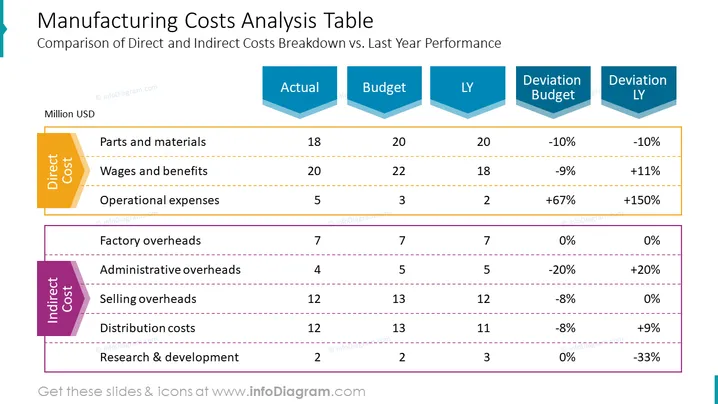
Manufacturing Costs Analysis Table
Slide Content
The slide is dedicated to the comparison of direct and indirect manufacturing costs against the actual, budget, and last year (LY) performance. Direct costs include parts and materials, wages and benefits, and operational expenses, each associated with specific values and their deviations from budget and LY. Indirect costs are comprised of factory, administrative, and selling overheads, along with distribution costs and research & development, also with their corresponding values and deviations. The slide breaks down these costs to showcase where financial variances occur and to what extent relative to the budgeted amounts and previous year's figures.
Graphical Look
- The slide title is at the top in a large, bold font.
- Two main sections divide the slide: one labeled "Direct Cost" highlighted in orange, and one labeled "Indirect Cost" highlighted in purple.
- Each section contains a list of cost elements with horizontal lines separating them.
- A multi-column table presents numerical data with headers "Actual," "Budget," "LY," "Deviation Budget," and "Deviation LY."
- Each header is placed within arrow-shaped, stylized containers colored in shades of blue, with the data below in regular text.
- Percentages indicating deviations from the budget and LY figures are in red or green, showing negative or positive changes.
The slide maintains a clean and structured layout with contrasting colors for differentiation. It uses color-coded sections and clear fonts to present complex financial data in a digestible format.
Use Cases
- Presenting financial results to management or stakeholders to highlight performance against the budget and previous year.
- Using in budget review meetings to identify areas where costs have deviated from expectations significantly.
- Providing a visual aid for financial analysis during internal strategy sessions to inform cost optimizations.
- Illustrating financial data in investor presentations to demonstrate prudent financial management and control.
How to Edit
How to edit text & colors

How to expand / shorten diagram

How to Replace Icons in infoDiagram PPT


