Reviews
Sus gráficos añaden un toque agradable a mis presentaciones y recientemente los usé para una de mis reuniones generales. Su conjunto de herramientas añade profesionalismo a mis diapositivas. En lugar de usar imágenes prediseñadas estándar.
Necesitaba un aspecto fresco para algunas de mis diapositivas. Había intentado encontrar una forma de crear un efecto de pincel, de subrayar, acentuar, añadir algo de color y los marcadores escritos a mano fueron justo lo que necesitaba. Muy fácil de usar, fácil de ajustar el tamaño, cambiar el color. Fue una solución asequible y perfecta, y estoy feliz de recomendarla.
El aspecto nítido y limpio de los gráficos, y el hecho de que me permitiera editar y cambiar fácilmente los colores para que coincidieran con la plantilla fue mi principal razón para comprarlos.
Description
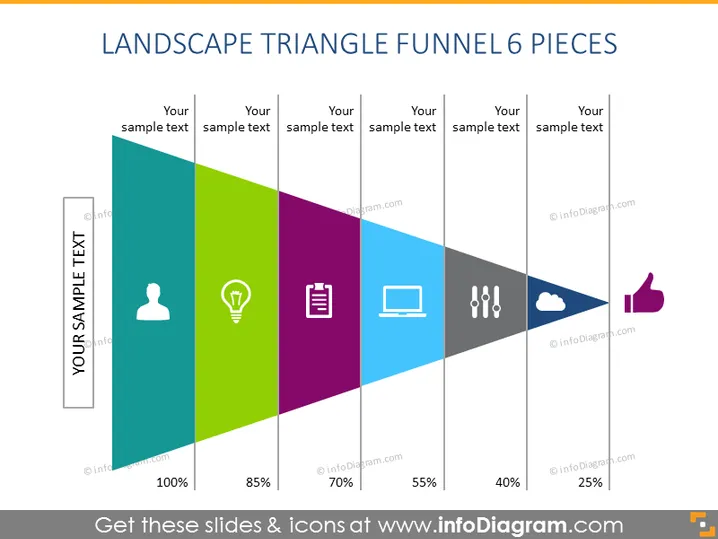
LANDSCAPE TRIANGLE FUNNEL 6 PIECES
Slide Content
The slide visualizes a process through a funnel with six segments, labeled 'Your sample text' and corresponding percentages ranging from 100% to 25%. Each segment is associated with an icon: a person, a light bulb, a document list, a laptop, exclamation points, and a cloud, likely representing stages or elements such as lead acquisition, idea generation, documentation, technical process, critical assessment, and cloud services respectively. The last segment points towards a thumbs-up icon, usually symbolizing approval or completion.
Graphical Look
- The slide title "LANDSCAPE TRIANGLE FUNNEL 6 PIECES" in bold, dark text at the top.
- Six colored, diagonal, elongated triangle sections forming a funnel shape.
- Each triangle has a distinct color gradation from dark to light: gray, green, purple, blue, dark gray, and lighter gray.
- Inside each triangle section, there is an icon with a surrounding circle, representing different concepts:
- A person silhouette in the first segment indicative of individuals or customers.
- A lightbulb in the second segment suggesting ideas or innovation.
- Stacked papers in the third segment representing documentation or data.
- A laptop in the fourth segment symbolizing technology or processing.
- Two exclamation points in the fifth segment denoting alerts or warnings.
- A cloud in the sixth segment, potentially implying cloud computing or storage.
- Text placeholders labeled 'Your sample text' above each segment indicate areas for customization.
- On the bottom, percentages decrease from 100% in the first segment to 25% in the last, indicating the narrowing nature of a funnel.
- At the end of the funnel, there is a thumbs-up icon, likely representing success or goal achievement.
The slide is designed with a clean, modern aesthetic, using bright colors to differentiate sections and icons to visually communicate the step or idea associated with each stage in the funnel. The funnel provides a visual representation of a decreasing process or filtering progression.
Use Cases
- Illustrating stages of a sales process or customer journey, where prospects are narrowed down to leads, and then to actual customers.
- Depicting a project development lifecycle, showing how ideas are shaped and refined until final approval.
- Outlining a workflow or production line in manufacturing or service delivery, clarifying how input is processed through various stages.
- Presenting a marketing strategy, highlighting how campaigns are designed to attract, engage, and convert targets into clients.
How to Edit
How to edit text & colors

How to expand / shorten diagram

How to Replace Icons in infoDiagram PPT


