Reviews
Your graphics add a nice touch to my presentations and I recently used them for one of my all-hands meetings. Your toolbox adds professionalism to my slides. Instead of using standard clipart.
I needed a fresh look at some of my slides. I've tried to find a way to create a paintbrush effect, to underline, accentuate, add some color and the handwritten markers were just the things. Very easy to use, easy to size, change the color. It was an affordable, perfect solution and I'm happy to recommend it.
The crisp, clean look of the graphics, and the fact that it allowed me to easily edit and change the colors to match the template was my main reason for purchasing them.
Description
Present your website traffic statistics
Slide Content
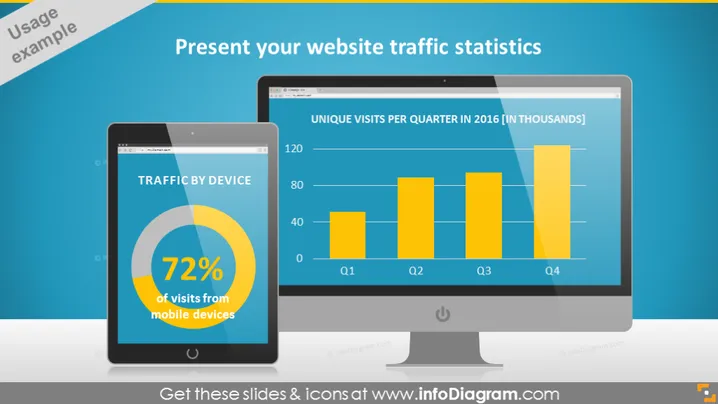
The slide is designed to present website traffic statistics, focusing on device usage and unique visits per quarter. The "TRAFFIC BY DEVICE" section highlights that 72% of visits are from mobile devices, indicating the importance of mobile optimization for the website. The bar graph titled "UNIQUE VISITS PER QUARTER IN 2016 [IN THOUSANDS]" shows a quarterly distribution, suggesting a trend analysis or performance overview of website traffic within that year.
Graphical Look
- The slide title "Present your website traffic statistics" is prominently displayed in white text at the top.
- Two graphical objects simulate electronic devices—a tablet on the left and a computer monitor on the right.
- Inside the tablet, a pie chart illustrates "TRAFFIC BY DEVICE" with a significant portion highlighted, showing that 72% of traffic comes from mobile devices.
- The computer monitor displays a yellow bar graph comparing "UNIQUE VISITS PER QUARTER IN 2016 [IN THOUSANDS]" with a legend indicating quarterly intervals (Q1, Q2, Q3, and Q4).
- A light blue background is present behind the title and a darker blue behind the graphics, creating a visual contrast.
- Usage example label in the upper left corner with a light blue ribbon effect.
The slide uses a combination of icons, colors, and shapes to create a visually engaging presentation of data. The contrasting blue shades and realistic device mockups provide a professional and modern aesthetic.
Use Cases
- Reporting website performance metrics during a digital marketing meeting.
- Showcasing mobile versus desktop traffic in a web development or design presentation to emphasize the need for responsive design.
- Providing a quarterly business review to stakeholders with a focus on digital growth and trends.
- Utilizing in an investor pitch deck to demonstrate company reach and online engagement.
How to Edit
How to edit text & colors

How to expand / shorten diagram

How to Replace Icons in infoDiagram PPT


