Reviews
Your graphics add a nice touch to my presentations and I recently used them for one of my all-hands meetings. Your toolbox adds professionalism to my slides. Instead of using standard clipart.
I needed a fresh look at some of my slides. I've tried to find a way to create a paintbrush effect, to underline, accentuate, add some color and the handwritten markers were just the things. Very easy to use, easy to size, change the color. It was an affordable, perfect solution and I'm happy to recommend it.
The crisp, clean look of the graphics, and the fact that it allowed me to easily edit and change the colors to match the template was my main reason for purchasing them.
Description
Key Annual Achievements and Milestones Summary
Slide Content:
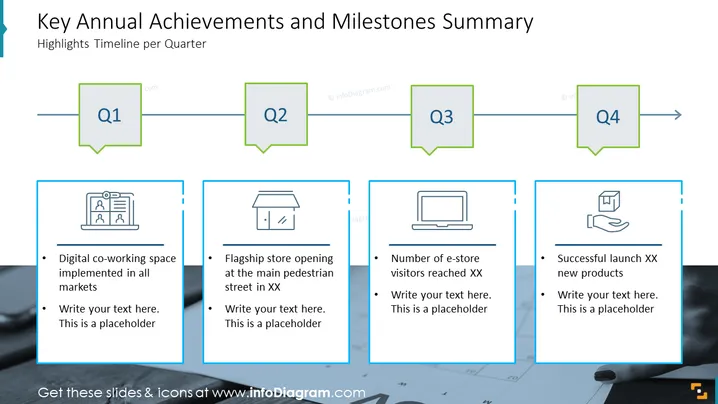
The slide is a quarterly timeline of a company's key annual achievements and milestones, showcasing significant accomplishments such as the implementation of a digital co-working space, the opening of a flagship store, and the attainment of a certain number of e-store visitors. There is also a mention of a successful launch of new products, indicating these highlights are part of a strategic performance review or business progress update.
Graphical Look:
- The slide features a horizontal timeline across the top with four quarters labeled Q1 through Q4, each inside a speech bubble-like shape with a pointed bottom.
- Below each quarter, there is a corresponding text box with a blue border and an icon at the top left corner, suggesting the type of achievement.
- The icons include a computer screen for digital implementation, a storefront for the flagship store, a monitor for e-store metrics, and a package for new product launches.
- Each text box has space for additional text, with only the top bullet point filled in with specific achievements.
- The color scheme is a combination of blues and greens against a light background, giving the slide a crisp and professional appearance.
Overall, the slide has a structured and clean design, with a simple color palette that aids in focusing attention on the content. The use of icons provides a quick visual reference to the type of achievements highlighted.
Use Cases:
This slide could be utilized in various business presentation scenarios, such as:
- Annual general meetings to report on the year's achievements.
- Quarterly business reviews to track progress against annual goals.
- Strategy meetings to discuss past performance and future objectives.
- Investor presentations to highlight company growth and achievements.
How to Edit
How to edit text & colors

How to expand / shorten diagram

How to Replace Icons in infoDiagram PPT


