Reviews
Sus gráficos añaden un toque agradable a mis presentaciones y recientemente los usé para una de mis reuniones generales. Su conjunto de herramientas añade profesionalismo a mis diapositivas. En lugar de usar imágenes prediseñadas estándar.
Necesitaba un aspecto fresco para algunas de mis diapositivas. Había intentado encontrar una forma de crear un efecto de pincel, de subrayar, acentuar, añadir algo de color y los marcadores escritos a mano fueron justo lo que necesitaba. Muy fácil de usar, fácil de ajustar el tamaño, cambiar el color. Fue una solución asequible y perfecta, y estoy feliz de recomendarla.
El aspecto nítido y limpio de los gráficos, y el hecho de que me permitiera editar y cambiar fácilmente los colores para que coincidieran con la plantilla fue mi principal razón para comprarlos.
Description
IT Security Services Offer Portfolio
Slide Content
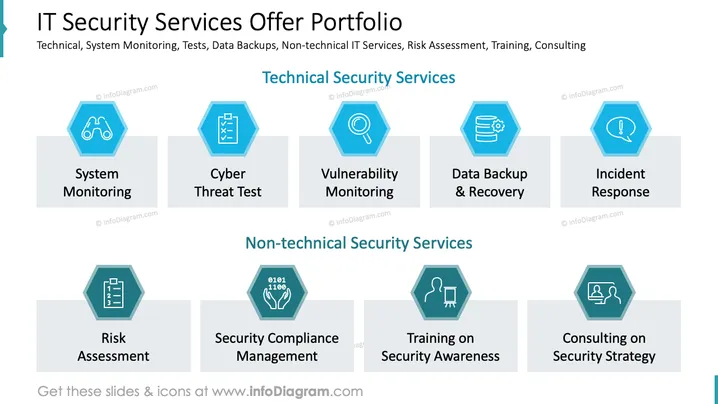
The slide provides an overview of IT security services, divided into technical and non-technical categories.
- System Monitoring: Continuous observation of systems for performance and security.
- Cyber Threat Test: Assessing vulnerabilities through simulated cyber-attacks.
- Vulnerability Monitoring: Regular checks for security weaknesses in systems.
- Data Backup & Recovery: Ensuring data is backed up and can be restored.
- Incident Response: Quick reaction to security breaches or attacks.
- Risk Assessment: Evaluating potential security risks in IT systems.
- Security Compliance Management: Ensuring adherence to security regulations.
- Training on Security Awareness: Educating employees on recognizing and avoiding security threats.
- Consulting on Security Strategy: Advising on creating comprehensive security plans.
Graphical Look
- The slide background is plain white with a clean and professional appearance.
- A structured header with bold text uses black for the main title and dark gray for the subtitle.
- Hexagon icons in blue are consistently used for categorizing services, accompanied by descriptive labels.
- Icons inside the hexagons visually represent the corresponding service, such as a checklist or a server.
- The layout is organized in two rows, categorizing services into technical and non-technical.
- Light gray boxes provide a background for each descriptive label beneath the hexagon icons.
The overall look is neat, with a businesslike and visually appealing design that emphasizes clarity and organization.

Use Cases
- Presenting IT security service offerings to clients.
- Training sessions on different security functions.
- Internal meetings for IT strategic planning.
- Marketing IT security services to potential customers.
How to Edit
How to edit text & colors

How to expand / shorten diagram

How to Replace Icons in infoDiagram PPT

