Reviews
Your graphics add a nice touch to my presentations and I recently used them for one of my all-hands meetings. Your toolbox adds professionalism to my slides. Instead of using standard clipart.
I needed a fresh look at some of my slides. I've tried to find a way to create a paintbrush effect, to underline, accentuate, add some color and the handwritten markers were just the things. Very easy to use, easy to size, change the color. It was an affordable, perfect solution and I'm happy to recommend it.
The crisp, clean look of the graphics, and the fact that it allowed me to easily edit and change the colors to match the template was my main reason for purchasing them.
Description
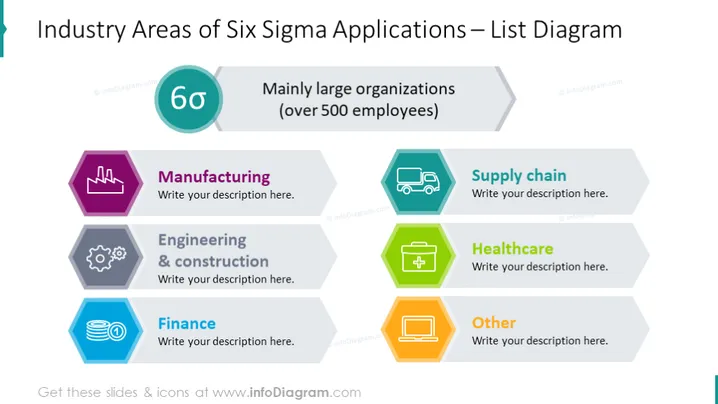
Industry Areas of Six Sigma Applications – List Diagram
Slide Content
The slide is entitled "Industry Areas of Six Sigma Applications – List Diagram" and encompasses a list diagram highlighting sectors that benefit from Six Sigma methodologies, typically in large organizations with over 500 employees. It features Six Sigma's diverse application across various industries, evident in five distinct categories: "Manufacturing," "Engineering & construction," "Finance," "Supply chain," and "Healthcare," with an additional "Other" category for non-specified industries.
Graphical Look
- The slide has a clean and professional layout with a teal and grey color scheme.
- On the top left, there is a circular Six Sigma icon with "6σ" inside it.
- Adjacent to the icon, there is a text box with the title "Mainly large organizations (over 500 employees)" in a lighter grey.
- There are six hexagonal icons arrayed in two rows, each with a distinct color, accompanied by a larger text box for descriptions.
- The icons represent different industries, symbolized by stylized images: factory (Manufacturing), gears (Engineering & construction), stacked coins (Finance), delivery truck (Supply chain), medical cross (Healthcare), and a generic rectangle (Other).
- Each hexagonal icon is connected to its corresponding text box where descriptions are to be added.
The layout is symmetric and balanced, with icons and text areas neatly organized to facilitate an easy reading flow. The color-coded hexagons and related industry icons make it visually appealing and help in quickly associating each sector with its field.
Use Cases
- Ideal for corporate presentations to discuss the implementation of Six Sigma processes across different departments or industries.
- Suitable for training seminars introducing Six Sigma concepts to employees in various sectors.
- Can be used in strategy meetings where company leaders plan to adopt or optimize Six Sigma practices.
- Helpful as an educative tool in academic settings, like business management courses, to illustrate the wide-ranging applicability of Six Sigma methodologies.
How to Edit
How to edit text & colors

How to expand / shorten diagram

How to Replace Icons in infoDiagram PPT


