

Your graphics add a nice touch to my presentations and I recently used them for one of my all-hands meetings. Your toolbox adds professionalism to my slides. Instead of using standard clipart.
Claude Jones, Director of Engineer, @Walmartlabs, USA

Your graphics add a nice touch to my presentations and I recently used them for one of my all-hands meetings. Your toolbox adds professionalism to my slides. Instead of using standard clipart.
Claude Jones, Director of Engineer, @Walmartlabs, USA
I needed a fresh look at some of my slides. I've tried to find a way to create a paintbrush effect, to underline, accentuate, add some color and the handwritten markers were just the things. Very easy to use, easy to size, change the color. It was an affordable, perfect solution and I'm happy to recommend it.
Anonymous, US
The crisp, clean look of the graphics, and the fact that it allowed me to easily edit and change the colors to match the template was my main reason for purchasing them.
Brandie Jenkins, E-learning Developer, USA
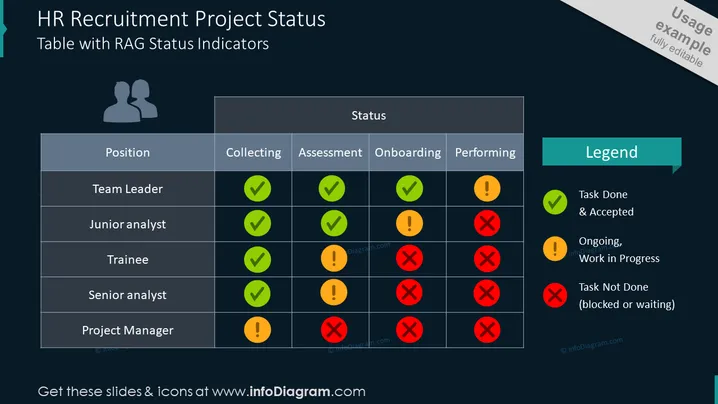
##Slide contents: The HR Recruitment Project Status demonstrates a table with RAG Status indicators for the human resource recruiting process. You can use this PowerPoint Presentation template if you are a recruiter who wants to hire qualified candidates to work in your company. This slide represents the job opening of the potential candidate and the status. The positions are team leader, junior analyst, trainee, senior analyst, and project manager. Each job position has the following information that needs to be gathered for the HR department: collecting applicants, assessing job candidates, onboarding, and performance. You can illustrate the recruitment process with traffic light colors. The green check shows that the task is done and accepted. The amber exclamation mark shows that the process is still ongoing, and the red blocked sign implies that is not done because it is blocked. You can also add a legend next to the table to illustrate the RAG indicators of your HR recruitment process. ##Slide Infographic Description: Black Background, Table, Traffic Lights Graphics, RAG Traffic Lights Graphics, Green Color, Amber Color, Red Color, Team Icon, People Icon, Ok Check Icon, Danger Icon, Attention Icon, Exclamation Mark Icon, Blocked Sign Icon



