

Your graphics add a nice touch to my presentations and I recently used them for one of my all-hands meetings. Your toolbox adds professionalism to my slides. Instead of using standard clipart.
Claude Jones, Director of Engineer, @Walmartlabs, USA

Your graphics add a nice touch to my presentations and I recently used them for one of my all-hands meetings. Your toolbox adds professionalism to my slides. Instead of using standard clipart.
Claude Jones, Director of Engineer, @Walmartlabs, USA
I needed a fresh look at some of my slides. I've tried to find a way to create a paintbrush effect, to underline, accentuate, add some color and the handwritten markers were just the things. Very easy to use, easy to size, change the color. It was an affordable, perfect solution and I'm happy to recommend it.
Anonymous, US
The crisp, clean look of the graphics, and the fact that it allowed me to easily edit and change the colors to match the template was my main reason for purchasing them.
Brandie Jenkins, E-learning Developer, USA
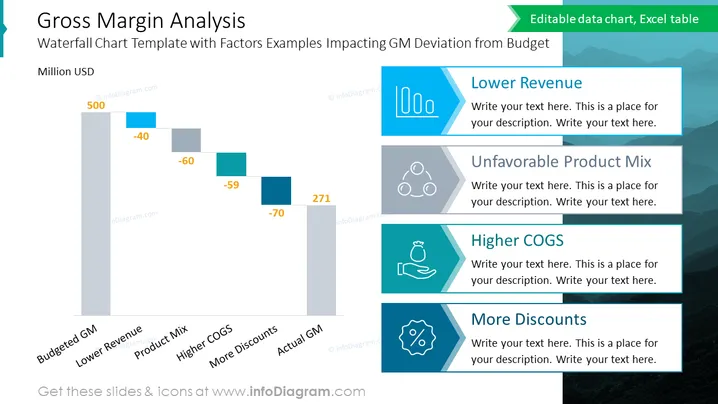
The slide presents a "Gross Margin Analysis" using a Waterfall Chart Template to illustrate factors impacting GM (Gross Margin) deviation from the budget. The analysis begins with a Budgeted GM of $500 million and shows declines due to Lower Revenue (-$40 million), Unfavorable Product Mix (-$60 million), and Higher COGS (Cost of Goods Sold, -$59 million), partially offset by More Discounts (+$70 million), culminating in an Actual GM of $271 million.
The slide uses a cohesive blue color palette with varying shades to distinguish different elements. The clear, structured layout combines visual data representation and text boxes effectively for an informative presentation.



