Reviews
Your graphics add a nice touch to my presentations and I recently used them for one of my all-hands meetings. Your toolbox adds professionalism to my slides. Instead of using standard clipart.
I needed a fresh look at some of my slides. I've tried to find a way to create a paintbrush effect, to underline, accentuate, add some color and the handwritten markers were just the things. Very easy to use, easy to size, change the color. It was an affordable, perfect solution and I'm happy to recommend it.
The crisp, clean look of the graphics, and the fact that it allowed me to easily edit and change the colors to match the template was my main reason for purchasing them.
Description
Grids System for Harmonic Layout
Slide Content
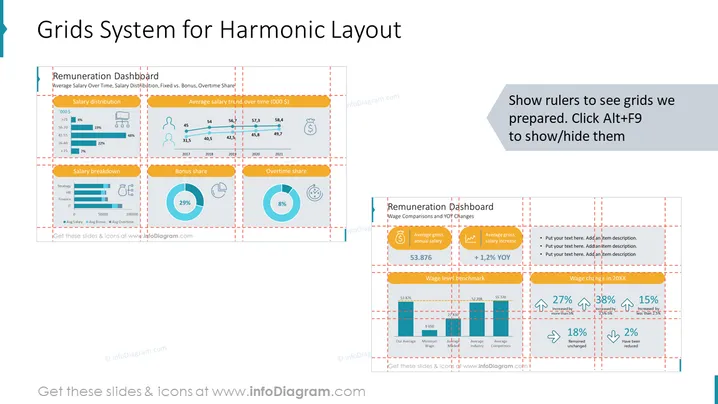
The slide is titled "Grids System for Harmonic Layout" and seems to focus on illustrating a harmonious and structured approach to presenting data. It includes a section labeled "Remuneration Dashboard" with several data visualization elements such as charts and graphs representing salary distribution, average salary trends over time, a salary breakdown, bonus share, and overtime share. These elements provide a clear understanding of the salaries, bonuses, and overtime which are important aspects of employee compensation.
Graphical Look
- The slide background is white with a light blue overlay near the bottom.
- Multiple orange dashed rectangles are used to highlight and separate different sections of the slide, suggesting alignment to a grid system.
- There are three bar charts with varying shades of blue bars, presenting salary distribution data.
- A line chart tracks the average salary trend over time, using an orange line with noticeable data points marked along it.
- A donut chart shows the bonus share, and another one presents the overtime share, both in shades of blue with accompanying icons.
- Text boxes provide contextual information and data labels, with a mix of bold and regular fonts for emphasis.
- A circular icon with a clock represents overtime, and a money bag icon represents bonuses.
- A small instructional text box in the top right encourages showing the grid with a keyboard shortcut.
The slide uses a crisp and professional design with a well-organized structure. The consistent color palette and variety of chart types create an engaging visual experience while effectively communicating complex data.
Use Cases
- To present an overall compensation analysis in HR department meetings or corporate board presentations.
- For visualizing company financial data during annual reviews or budget planning sessions.
- To articulate compensation strategies and trends in investor relations materials.
- As an informative slide in training materials for new managers or HR staff explaining the structure of employee remuneration.
How to Edit
How to edit text & colors

How to expand / shorten diagram

How to Replace Icons in infoDiagram PPT


