Reviews
Your graphics add a nice touch to my presentations and I recently used them for one of my all-hands meetings. Your toolbox adds professionalism to my slides. Instead of using standard clipart.
I needed a fresh look at some of my slides. I've tried to find a way to create a paintbrush effect, to underline, accentuate, add some color and the handwritten markers were just the things. Very easy to use, easy to size, change the color. It was an affordable, perfect solution and I'm happy to recommend it.
The crisp, clean look of the graphics, and the fact that it allowed me to easily edit and change the colors to match the template was my main reason for purchasing them.
Description
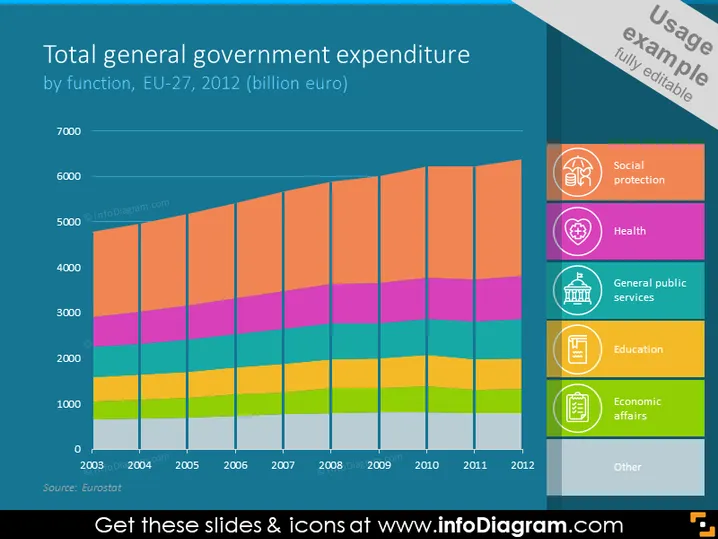
Total general government expenditure by function, EU-27, 2012 (billion euro)
Slide Content
The slide depicts a stacked bar chart illustrating the total general government expenditure of the EU-27 countries in 2012, segmented by various government functions such as social protection, health, general public services, education, economic affairs, and others. Each segment represents a different area of expenditure and their respective proportions in relation to the total expenditure. Social protection appears to be the largest segment, indicating it's the area where the most funds are allocated.
Graphical Look
- The slide features a colorful stacked bar chart with years on the x-axis and expenditure in billion euros on the y-axis.
- Each color in the bar chart represents a different category of government expenditure.
- There are six icons to the right, each corresponding to a color on the chart and labeled with expenditure categories.
- The slide background is a dark teal color with a lighter teal sidebar, which contains the icons and labels.
- Each label in the sidebar has a unique icon in a circle that visually associates with its category.
- The icons include representations of a piggy bank for social protection, a heart for health, a classical building for general public services, a graduation cap for education, gears for economic affairs, and a miscellaneous icon for other expenses.
The slide has a clean and modern design with easily distinguishable colors and clearly labeled sections that facilitate quick comprehension. The icons are simple yet effective in visually representing the different categories of government expenditure.
Use Cases
- Presenting comprehensive financial overviews to government officials or departments.
- Providing visual aids during budget planning or review meetings in public sector organizations.
- Analyzing trends in government spending over time for economic or policy presentations.
- Offering a breakdown of expenditure areas during academic lectures on public finance or European Union economics.
How to Edit
How to edit text & colors

How to expand / shorten diagram

How to Replace Icons in infoDiagram PPT


