

Your graphics add a nice touch to my presentations and I recently used them for one of my all-hands meetings. Your toolbox adds professionalism to my slides. Instead of using standard clipart.
Claude Jones, Director of Engineer, @Walmartlabs, USA

Your graphics add a nice touch to my presentations and I recently used them for one of my all-hands meetings. Your toolbox adds professionalism to my slides. Instead of using standard clipart.
Claude Jones, Director of Engineer, @Walmartlabs, USA
I needed a fresh look at some of my slides. I've tried to find a way to create a paintbrush effect, to underline, accentuate, add some color and the handwritten markers were just the things. Very easy to use, easy to size, change the color. It was an affordable, perfect solution and I'm happy to recommend it.
Anonymous, US
The crisp, clean look of the graphics, and the fact that it allowed me to easily edit and change the colors to match the template was my main reason for purchasing them.
Brandie Jenkins, E-learning Developer, USA
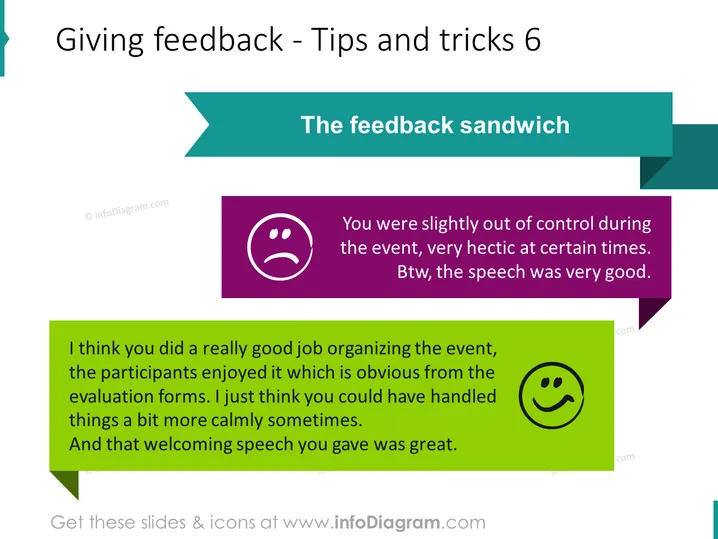
The slide presents the concept of "The feedback sandwich," a technique for giving constructive feedback. It involves starting with a positive comment, then providing a critique or suggestion for improvement, followed by another positive comment. The goal is to balance criticism with praise to prevent demoralization and encourage improvement. The example on the slide demonstrates this method with two positive observations about good organization and an excellent welcoming speech, with a critique that things could have been handled more calmly in between.
The overall look of the slide is clean and organized, with high-contrast colored sections making information clear and easily digestible. The use of graphical elements like speech bubbles and emoticons effectively illustrates the concept and sequence of the feedback sandwich method.



