Reviews
Your graphics add a nice touch to my presentations and I recently used them for one of my all-hands meetings. Your toolbox adds professionalism to my slides. Instead of using standard clipart.
I needed a fresh look at some of my slides. I've tried to find a way to create a paintbrush effect, to underline, accentuate, add some color and the handwritten markers were just the things. Very easy to use, easy to size, change the color. It was an affordable, perfect solution and I'm happy to recommend it.
The crisp, clean look of the graphics, and the fact that it allowed me to easily edit and change the colors to match the template was my main reason for purchasing them.
Description
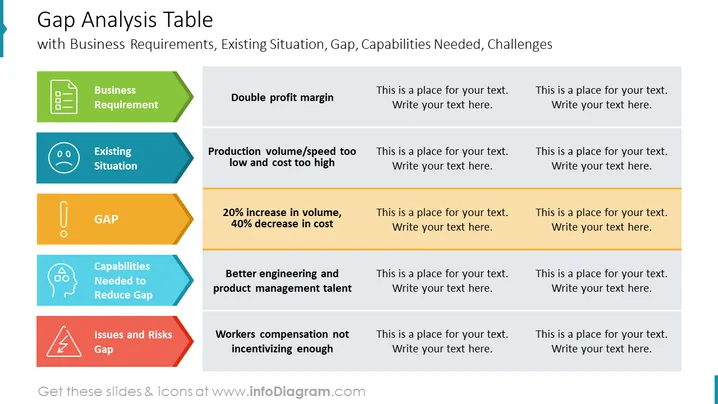
Gap Analysis Table
Slide Content:
Business Requirement: Achieve double profit margin Existing Situation: Production volume/speed is too low and cost is too high. Gap: 20% increase in volume, 40% decrease in cost. Capabilities Needed to Reduce Gap: Better engineering and product management talent. Issues and Risks Gap: Workers compensation not incentivizing enough.
Graphical Look:
- The slide is divided into five sections: Business Requirement, Existing Situation, Gap, Capabilities Needed to Reduce Gap, and Issues and Risks Gap.
- The title of the slide is at the top of the slide, in a large font.
- The text in the table is in a smaller font.
- The background of the slide is white.
- The slide also includes a few simple icons.
Use Cases
You can use such a slide in a variety of settings, such as:
- Presenting the results of a gap analysis to stakeholders.
- Identifying areas where there is a gap between current performance and desired performance.
- Developing a plan to close the gap and achieve desired performance.
How to Edit
How to edit text & colors

How to expand / shorten diagram

How to Replace Icons in infoDiagram PPT


