Reviews
Ihre Grafiken verleihen meinen Präsentationen eine nette Note, und ich habe sie kürzlich für eines meiner All-Hands-Meetings verwendet. Ihre Toolbox verleiht meinen Folien Professionalität, anstatt Standard-Clipart zu verwenden.
Ich brauchte einen neuen Blick auf einige meiner Folien. Ich habe versucht, einen Weg zu finden, einen Pinselschlag-Effekt zu erzielen, um zu unterstreichen, hervorzuheben, Farbe hinzuzufügen, und die handgeschriebenen Markierungen waren genau das Richtige. Sehr einfach zu bedienen, leicht in der Größe zu ändern, die Farbe zu ändern. Es war eine erschwingliche, perfekte Lösung und ich empfehle sie gerne weiter.
Die klare, saubere Optik der Grafiken und die Tatsache, dass ich die Farben leicht bearbeiten und an die Vorlage anpassen konnte, war mein Hauptgrund für den Kauf.
Description
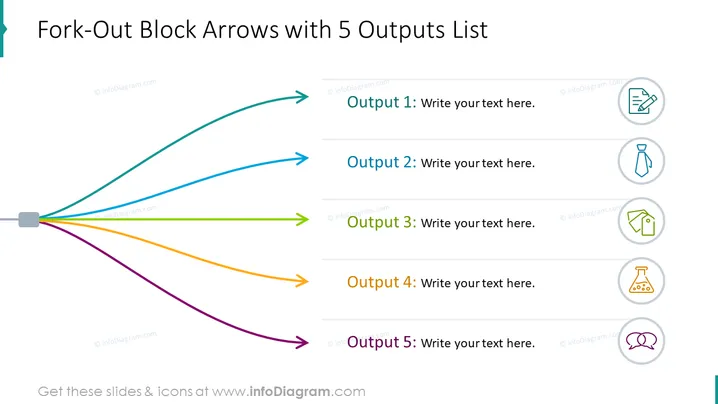
Fork-Out Block Arrows with 5 Outputs List
Slide Content
The slide depicts a process with five divergent outcomes, using block arrows to represent each output. "Output 1" through "Output 5" are listed adjacent to corresponding arrows and placeholder text invites the viewer to add specific information. This visual format is effective for showing the results or consequences stemming from a central initiative or decision point. Each output is paired with a unique icon, suggesting that the outputs can vary greatly in nature or category.
Graphical Look
- A central grey block serves as the starting point for five colorful arrows that fan out across the slide.
- The arrows are wide and have a distinctive block-style rendering, each in a unique color (cyan, blue, green, orange, purple).
- Next to each arrow is a text box with a grey horizontal line and placeholder text like "Write your text here."
- Above each text box, there are circular icons enclosed in light grey rings, with symbols representing actions or objects, such as a clipboard, tie, scale, flask, and speech bubble.
The slide is clean and modern, with a balance of bold colors against a light background. The design is functional, with clear distinctions between each output by both color and icon.
Use Cases
- Illustrating the multiple outcomes or deliverables of a business project or initiative.
- Breaking down the services or products offered by a company into distinct categories.
- Demonstrating the potential impacts or results from implementing a specific strategy or campaign.
- Outlining different departmental responsibilities or task assignments stemming from a central corporate decision.
How to Edit
How to edit text & colors

How to expand / shorten diagram

How to Replace Icons in infoDiagram PPT


