Reviews
Sus gráficos añaden un toque agradable a mis presentaciones y recientemente los usé para una de mis reuniones generales. Su conjunto de herramientas añade profesionalismo a mis diapositivas. En lugar de usar imágenes prediseñadas estándar.
Necesitaba un aspecto fresco para algunas de mis diapositivas. Había intentado encontrar una forma de crear un efecto de pincel, de subrayar, acentuar, añadir algo de color y los marcadores escritos a mano fueron justo lo que necesitaba. Muy fácil de usar, fácil de ajustar el tamaño, cambiar el color. Fue una solución asequible y perfecta, y estoy feliz de recomendarla.
El aspecto nítido y limpio de los gráficos, y el hecho de que me permitiera editar y cambiar fácilmente los colores para que coincidieran con la plantilla fue mi principal razón para comprarlos.
Description
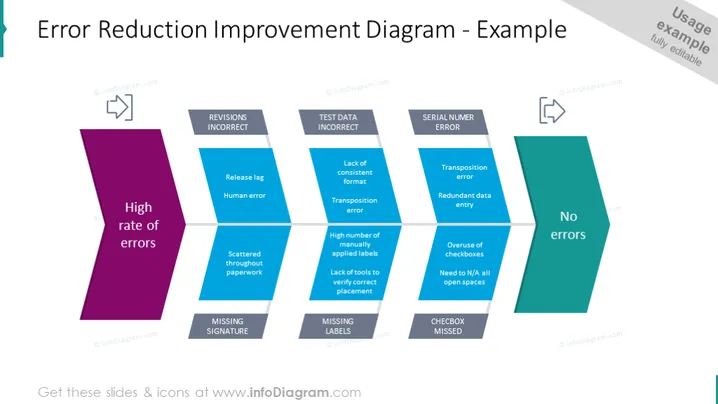
Error Reduction Improvement slide content
This slide shows a process of error reduction improvement, going from a high rate of errors to no errors.
- Revisions incorrect – release tag, human error
- Missing signature – scattered throughout the paper
- Test data incorrect – lack of consistent format, a transposition error
- Missing labels – high number of manually applied labels, lack of tools to verify correct placement
- Serial number error – transposition error, redundant data entry
- Checkbox missed – overuse of checkboxes, N/A all open spaces You can use this slide to explain your strategy for reducing errors in an easier-to-understand way and to leave an impact on your audience. All the graphics are editable, so you can customize the shapes without losing any quality. Video editing instructions are included if you have no experience with PPT editing. The presentation can be downloaded in Google Slides or Keynote. Click on the picture to see more fishbone diagram slide ideas.
Error Reduction Improvement slide infographics
Fishbone Diagram, Color Coding, Flat Outline Icon Vectors, Input Icon, Output Icon
How to Edit
How to edit text & colors

How to expand / shorten diagram

How to Replace Icons in infoDiagram PPT


