Reviews
Ihre Grafiken verleihen meinen Präsentationen eine nette Note, und ich habe sie kürzlich für eines meiner All-Hands-Meetings verwendet. Ihre Toolbox verleiht meinen Folien Professionalität, anstatt Standard-Clipart zu verwenden.
Ich brauchte einen neuen Blick auf einige meiner Folien. Ich habe versucht, einen Weg zu finden, einen Pinselschlag-Effekt zu erzielen, um zu unterstreichen, hervorzuheben, Farbe hinzuzufügen, und die handgeschriebenen Markierungen waren genau das Richtige. Sehr einfach zu bedienen, leicht in der Größe zu ändern, die Farbe zu ändern. Es war eine erschwingliche, perfekte Lösung und ich empfehle sie gerne weiter.
Die klare, saubere Optik der Grafiken und die Tatsache, dass ich die Farben leicht bearbeiten und an die Vorlage anpassen konnte, war mein Hauptgrund für den Kauf.
Description
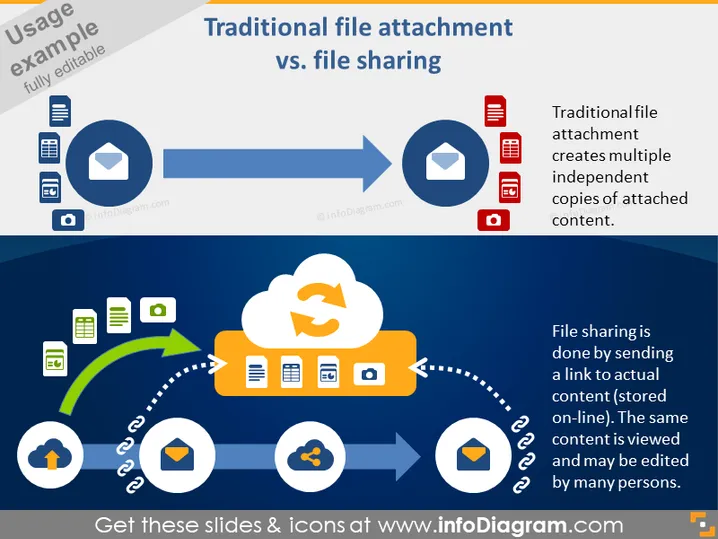
Traditional file attachment vs. file sharing
Slide Content
The slide contrasts two methods of file distribution: traditional file attachment and file sharing. Traditional file attachment is depicted as creating multiple independent copies of attached content, which could mean that each recipient has their own version of the file, potentially leading to synchronization issues. On the other hand, file sharing is presented as a method where a link to actual online-stored content is sent, suggesting that multiple users access a single, centralized version, facilitating collaboration and ensuring consistency across users.
Graphical Look
- The slide has a dark blue background with a lighter blue banner on top.
- Two horizontal diagrams, one above the other, illustrate the difference between file attachment and sharing.
- The upper diagram starts with an icon of a mobile device, document, and envelope linked by a solid blue line to an email icon, and ends in a series of icons representing documents which explain traditional attachment.
- The lower diagram features similar starting icons but uses a dotted blue line connected to a cloud symbol, which then links to multiple document and mobile device icons, representing file sharing.
- Arrows are used to showcase the flow from one process to another, with a green arrow emphasizing the path of sharing.
- The cloud symbol in the sharing section has a sync icon, showcasing the centralized update feature of file sharing.
- Each method is accompanied by brief explanatory text.
The slide's visual composition is direct and informative, employing icons and arrows neatly arranged to visually differentiate and explain the two concepts of file distribution. Its color scheme and shapes are designed for clarity and to visually guide the viewer through the process being described.
Use Cases
- Explaining the concept of cloud storage and its advantages over traditional email attachments in a business environment.
- Training new employees on company policies and best practices for sharing files and collaborating on documents.
- Pitching a proposal for upgrading an organization's document management system to incorporate cloud file sharing.
- Demonstrating the evolution of file distribution methods during tech-related workshops or seminars to highlight the efficiency gains from adopting modern practices.
How to Edit
How to edit text & colors

How to expand / shorten diagram

How to Replace Icons in infoDiagram PPT


