Reviews
Your graphics add a nice touch to my presentations and I recently used them for one of my all-hands meetings. Your toolbox adds professionalism to my slides. Instead of using standard clipart.
I needed a fresh look at some of my slides. I've tried to find a way to create a paintbrush effect, to underline, accentuate, add some color and the handwritten markers were just the things. Very easy to use, easy to size, change the color. It was an affordable, perfect solution and I'm happy to recommend it.
The crisp, clean look of the graphics, and the fact that it allowed me to easily edit and change the colors to match the template was my main reason for purchasing them.
Description
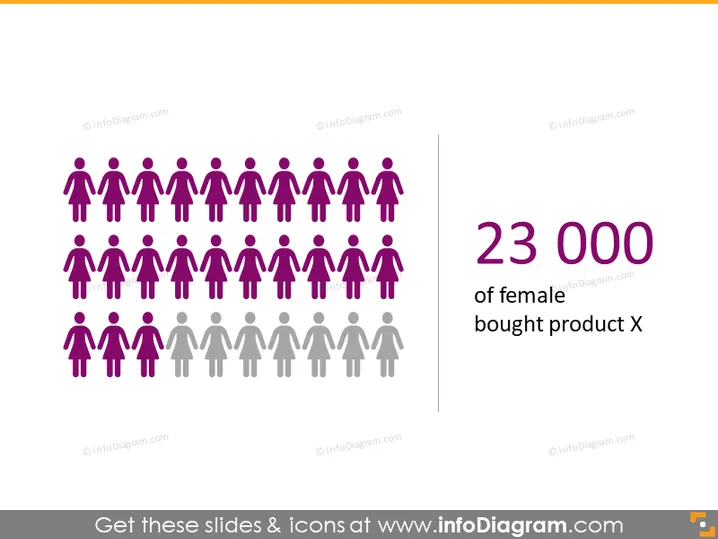
23 000 of female bought product X
Slide Content
The PowerPoint slide presents information about a product's customer base, specifically highlighting that 23,000 females purchased product X. The slide uses a graphic of multiple stylized people icons to visually indicate the gender distribution among the customers, with a larger number of icons representing females shown in a distinct color.
Graphical Look
- The slide background is plain white, providing high contrast for the slide content.
- On the left, there is a cluster of human figures arranged in rows with the majority colored in purple and a few in grey towards the bottom, representing different genders.
- The purple figures symbolize the female customers referenced in the slide title, creating a visual emphasis.
- The grey figures could indicate either male customers or the population not purchasing, offering a visual comparison.
- On the right side, there is a large, bold number "23 000" in purple, corresponding with the color of the female icons.
- Below the number, there is a text phrase "of female" in a smaller font size and the words "bought product X" in a font size that is larger than the former but smaller than the number, creating a visual hierarchy.
- There is a vertical line dividing the icon area from the textual information, reinforcing the separation of graphics and text.
The overall look of the slide is minimalistic and modern, using color to differentiate data and emphasize specific points. The visual elements are arranged to quickly convey the message and guide the viewer's focus from the quantitative data to the explanatory text.
Use Cases
- Presenting gender-specific marketing campaign results to highlight the effectiveness of targeting strategies.
- Showcasing sales demographics during a business review meeting to illustrate customer purchasing trends.
- Using in investor or stakeholder presentations to demonstrate market penetration among a particular demographic segment.
- Incorporating into a market analysis presentation to compare product appeal between different gender groups.
How to Edit
How to edit text & colors

How to expand / shorten diagram

How to Replace Icons in infoDiagram PPT


