Reviews
Your graphics add a nice touch to my presentations and I recently used them for one of my all-hands meetings. Your toolbox adds professionalism to my slides. Instead of using standard clipart.
I needed a fresh look at some of my slides. I've tried to find a way to create a paintbrush effect, to underline, accentuate, add some color and the handwritten markers were just the things. Very easy to use, easy to size, change the color. It was an affordable, perfect solution and I'm happy to recommend it.
The crisp, clean look of the graphics, and the fact that it allowed me to easily edit and change the colors to match the template was my main reason for purchasing them.
Description
Expansion Capital Investment Projects Table
Slide Content
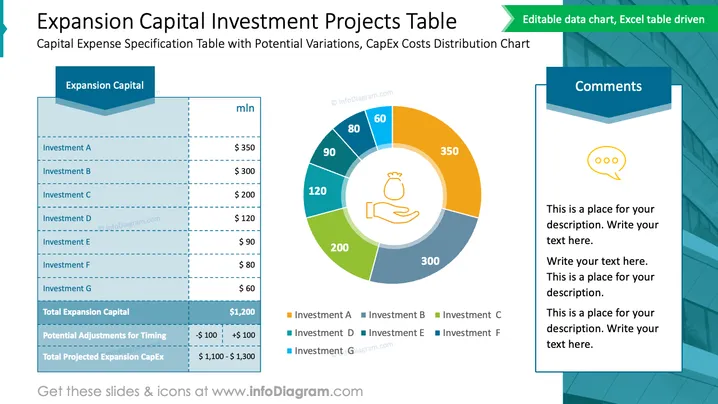
The PowerPoint slide is dedicated to outlining a detailed capital expense specification for expansion capital with potential variation and distribution of costs among various investments. It presents a table listing investments A through G with corresponding dollar amounts ranging from $350 million to $60 million. It also provides a total for expansion capital, adjustments for timing, and a projected total CapEx range. Each investment likely represents a project or asset expenditure being considered for capital investment.
Graphical Look
- The slide has a bold title in a large, dark font at the top.
- A light blue horizontal banner holds the subtitle beneath the main title.
- On the left, a table with investment names and figures is displayed; the columns are indicated by dotted lines.
- A color-coded donut chart occupies the right side of the slide, with labels and values for each investment.
- A legend below the chart matches investment names to colors seen in the chart.
- To the right of the chart, there is a speech bubble icon with a comments box area, ready for text input.
- The slide background is white.
The overall look of the slide is clean and professional, with a coordinated color scheme that helps differentiate the various investments. Graphical elements such as the table, chart, and comment box are well-spaced and easy to read.
Use Cases
- Presenting a financial overview of proposed expansion projects to stakeholders or investors.
- Comparing allocated budget across multiple projects during a strategic business meeting.
- Visualizing potential cost distributions for internal budget reviews or financial planning sessions.
- Explaining projected adjustments and the impact on total capital expenditure during executive summaries.
How to Edit
How to edit text & colors

How to expand / shorten diagram

How to Replace Icons in infoDiagram PPT


