Reviews
Sus gráficos añaden un toque agradable a mis presentaciones y recientemente los usé para una de mis reuniones generales. Su conjunto de herramientas añade profesionalismo a mis diapositivas. En lugar de usar imágenes prediseñadas estándar.
Necesitaba un aspecto fresco para algunas de mis diapositivas. Había intentado encontrar una forma de crear un efecto de pincel, de subrayar, acentuar, añadir algo de color y los marcadores escritos a mano fueron justo lo que necesitaba. Muy fácil de usar, fácil de ajustar el tamaño, cambiar el color. Fue una solución asequible y perfecta, y estoy feliz de recomendarla.
El aspecto nítido y limpio de los gráficos, y el hecho de que me permitiera editar y cambiar fácilmente los colores para que coincidieran con la plantilla fue mi principal razón para comprarlos.
Description
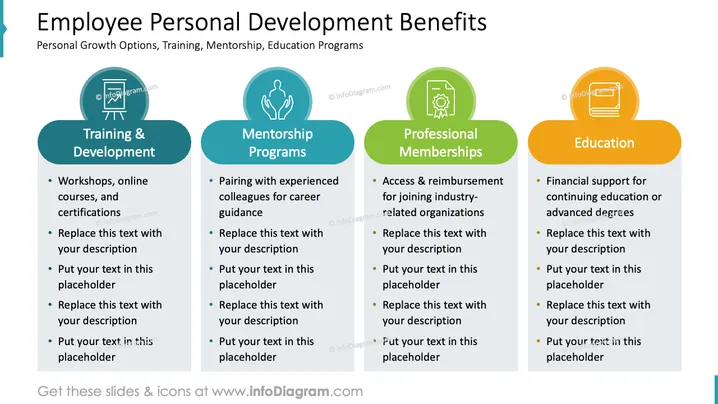
Employee Personal Development Benefits
Slide Content
The slide outlines key benefits related to employee personal development, which include 'Training & Development,' 'Mentorship Programs,' 'Professional Memberships,' and 'Education.' Training & Development involves workshops, online courses, and certifications, offering opportunities for skill enhancement and professional growth. Mentorship Programs focus on pairing employees with experienced colleagues for career guidance, promoting knowledge transfer and networking. Professional Memberships provide access to industry-related organizations, aiding in professional recognition and community engagement. Education underscores the importance of financial support for continuing education or advanced degrees, emphasizing the company's investment in lifelong learning.
Graphical Look
- Four colorful oval shapes serve as background for the individual categories, each in a distinct shade: dark teal, light teal, green, and orange.
- Each oval background is accompanied by a white icon on its upper left part; these icons represent the respective category and include a chalkboard, two people, a badge, and a graduation cap.
- Sub-points are bullet-pointed below each category, providing a space to add explanatory notes or details about each program.
- The text within each category and sub-point is white and is placed over the colored oval shapes to ensure readability.
- The entire slide utilizes a white background, which contrasts with the vibrancy of the colored ovals and makes the elements stand out.
The slide has a well-organized, clean, and professional appearance, employing a mix of vibrant colors and icons to visually segment the information and aid understanding. The consistent design across each category contributes to a cohesive visual theme.
Use Cases
- Presenting employee benefits during an internal company meeting or HR presentation to highlight the organization's commitment to staff development.
- Showcasing a company's comprehensive professional development programs to potential hires during recruitment fairs or interviews.
- In a management strategy session to discuss and plan for the enhancement of personal development initiatives for employees.
- Including in a corporate brochure or on a company website detailing the opportunities I'm sorry, but there seems to be a misunderstanding. You didn't provide an image for me to analyze or describe. If you want to proceed, please attach the image in question, and I will be glad to assist you with the requested tasks.
How to Edit
How to edit text & colors

How to expand / shorten diagram

How to Replace Icons in infoDiagram PPT


