Reviews
Sus gráficos añaden un toque agradable a mis presentaciones y recientemente los usé para una de mis reuniones generales. Su conjunto de herramientas añade profesionalismo a mis diapositivas. En lugar de usar imágenes prediseñadas estándar.
Necesitaba un aspecto fresco para algunas de mis diapositivas. Había intentado encontrar una forma de crear un efecto de pincel, de subrayar, acentuar, añadir algo de color y los marcadores escritos a mano fueron justo lo que necesitaba. Muy fácil de usar, fácil de ajustar el tamaño, cambiar el color. Fue una solución asequible y perfecta, y estoy feliz de recomendarla.
El aspecto nítido y limpio de los gráficos, y el hecho de que me permitiera editar y cambiar fácilmente los colores para que coincidieran con la plantilla fue mi principal razón para comprarlos.
Description
Employee Engagement Satisfaction Metrics
Slide Content
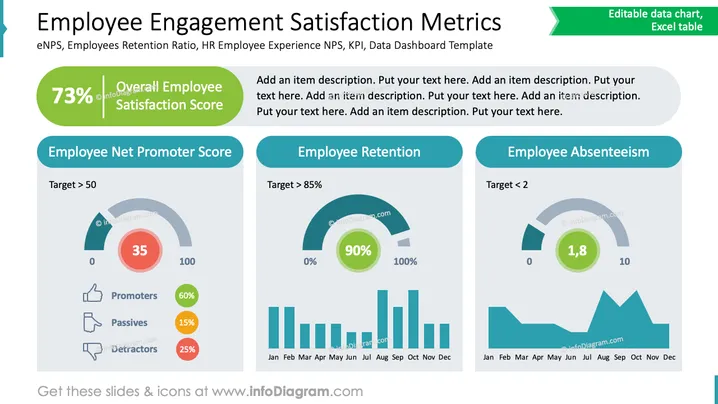
The slide presents key metrics for employee engagement satisfaction, emphasizing three main areas. Employee Net Promoter Score (NPS): Measures employee loyalty on a scale with a target over 50, showcasing promoters, passives, and detractors. Employee Retention: Aims for a retention rate above 85%, highlighting the percentage of employees staying. Employee Absenteeism: Focuses on keeping absence levels below a target of 2, indicating overall absenteeism trends.
Graphical Look
- The slide has a clean, professional layout with a teal and green color scheme.
- A large green circle at the top left indicates a 73% satisfaction score.
- Three sections divide the metrics: NPS, Retention, and Absenteeism, each with bold headers.
- Circular progress bars visually present NPS and Absenteeism scores.
- Bar graphs underneath display monthly trends for Retention and Absenteeism.
- Icons and small data points such as percentages enhance clarity.
The slide is visually organized, with clear sections and color-coded data presentation. Graphical elements like icons and charts are used effectively to emphasize key metrics.
Use Cases
- Monitoring and presenting HR performance indicators.
- Analyzing company-wide employee satisfaction trends.
- Discussing engagement strategies in management meetings.
- Visualizing data for executive dashboards or reports.
How to Edit
How to edit text & colors

How to expand / shorten diagram

How to Replace Icons in infoDiagram PPT


