Reviews
Your graphics add a nice touch to my presentations and I recently used them for one of my all-hands meetings. Your toolbox adds professionalism to my slides. Instead of using standard clipart.
I needed a fresh look at some of my slides. I've tried to find a way to create a paintbrush effect, to underline, accentuate, add some color and the handwritten markers were just the things. Very easy to use, easy to size, change the color. It was an affordable, perfect solution and I'm happy to recommend it.
The crisp, clean look of the graphics, and the fact that it allowed me to easily edit and change the colors to match the template was my main reason for purchasing them.
Description
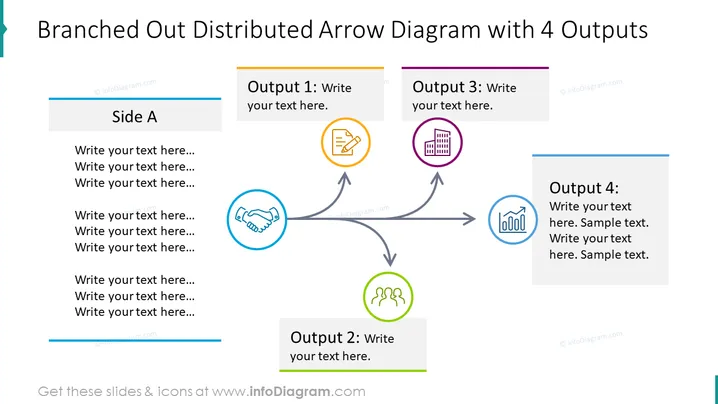
Branched Out Distributed Arrow Diagram with 4 Outputs
Slide Content
The slide presents a visual representation of a process or system with one input leading to four distinct outputs. "Side A" represents the input with space for descriptive text, and "Output 1," "Output 2," "Output 3," and "Output 4" are the subsequent branches with icons symbolizing different elements or steps: a document icon for Output 1 indicating written content, a handshake icon for Output 2 implying collaboration, a building icon for Output 3 possibly representing corporate structure or real estate, and a chart icon for Output 4 suggesting data or reports, each accompanied by boxes for additional text.
Graphical Look
- The slide features a large, bold title at the top.
- There is one large arrow stemming from a box labeled "Side A" to the right, branching into four smaller arrows.
- Each smaller arrow points to a corresponding output box with a unique color and icon.
- Output 1 has an orange color theme with a document icon.
- Output 2 has a green color theme with a handshake icon.
- Output 3 is purple with a building icon.
- Output 4 has a blue theme with a chart icon.
- The background of the slide is white, providing a clean contrast for the colorful elements.
The overall appearance of the slide is professional and clean, using a combination of colored text boxes and icons to convey information in a visually structured manner.
Use Cases
- Illustrating the various outcomes or deliverables of a business project or initiative.
- Demonstrating how a single strategic decision can lead to multiple tactical actions or results.
- Explaining the workflow processes in a company and the corresponding departments or teams involved.
- Outlining the distribution of tasks or resources originating from a central point or concept.
How to Edit
How to edit text & colors

How to expand / shorten diagram

How to Replace Icons in infoDiagram PPT


