Reviews
Sus gráficos añaden un toque agradable a mis presentaciones y recientemente los usé para una de mis reuniones generales. Su conjunto de herramientas añade profesionalismo a mis diapositivas. En lugar de usar imágenes prediseñadas estándar.
Necesitaba un aspecto fresco para algunas de mis diapositivas. Había intentado encontrar una forma de crear un efecto de pincel, de subrayar, acentuar, añadir algo de color y los marcadores escritos a mano fueron justo lo que necesitaba. Muy fácil de usar, fácil de ajustar el tamaño, cambiar el color. Fue una solución asequible y perfecta, y estoy feliz de recomendarla.
El aspecto nítido y limpio de los gráficos, y el hecho de que me permitiera editar y cambiar fácilmente los colores para que coincidieran con la plantilla fue mi principal razón para comprarlos.
Description
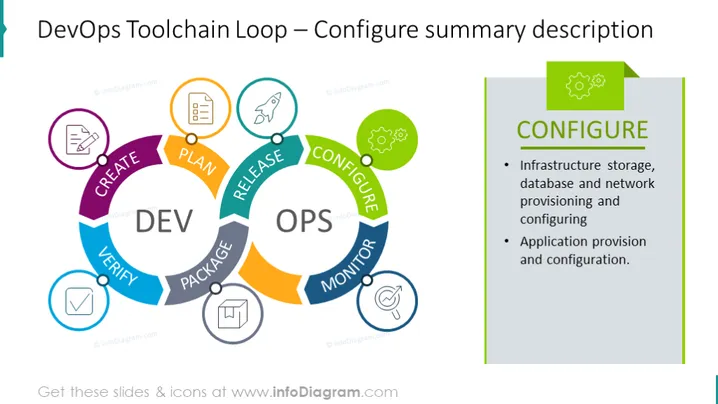
DevOps Toolchain Loop – Configure summary description
Slide Content
The slide provides a summary description of the "Configure" phase in the DevOps Toolchain Loop, highlighting two key areas: infrastructure storage, database, and network provisioning and configuring, which entails setting up and preparing storage solutions, databases, and network systems for use; and application provision and configuration, which involves deploying and setting up software applications within the environment.
Graphical Look
- A large circular diagram occupies the left side, beautifully divided into colorful segments labeled with phases of DevOps.
- Each segment has a unique color and is connected to form a loop, representing a continuous cycle.
- The 'CONFIGURE' phase is highlighted with a green border and connected to an adjacent rectangle containing corresponding text.
- Icons within colored circles sit atop each segment, visually symbolizing the phase steps, like planning, creating, verifying, and others.
- A prominent title to the right, with a bold 'CONFIGURE' text, draws attention to the specific phase.
- The right side features a shaded rectangle with more detailed bullet points explaining the 'CONFIGURE' phase.
- Both sides of the slide are bordered in a cohesive color scheme, adding to the visual organization.
The slide has a clean and professional design, with vibrant colors enhancing the visual appeal. The diagram offers an intuitive understanding of the DevOps process flow.
Use Cases
- In a presentation to explain the DevOps lifecycle and the role of configuration management to software development teams.
- During a workshop or training session focusing on implementing DevOps practices, to illustrate the various stages and their significance.
- As part of a pitch to management or stakeholders to showcase the comprehensive approach taken by the team in infrastructure and application setup.
- For onboarding new employees in IT and DevOps roles to help them understand the company's development and deployment processes.
How to Edit
How to edit text & colors

How to expand / shorten diagram

How to Replace Icons in infoDiagram PPT


