Reviews
Sus gráficos añaden un toque agradable a mis presentaciones y recientemente los usé para una de mis reuniones generales. Su conjunto de herramientas añade profesionalismo a mis diapositivas. En lugar de usar imágenes prediseñadas estándar.
Necesitaba un aspecto fresco para algunas de mis diapositivas. Había intentado encontrar una forma de crear un efecto de pincel, de subrayar, acentuar, añadir algo de color y los marcadores escritos a mano fueron justo lo que necesitaba. Muy fácil de usar, fácil de ajustar el tamaño, cambiar el color. Fue una solución asequible y perfecta, y estoy feliz de recomendarla.
El aspecto nítido y limpio de los gráficos, y el hecho de que me permitiera editar y cambiar fácilmente los colores para que coincidieran con la plantilla fue mi principal razón para comprarlos.
Description
Days Sales of Inventory DSI Ratio Analysis
Slide Content
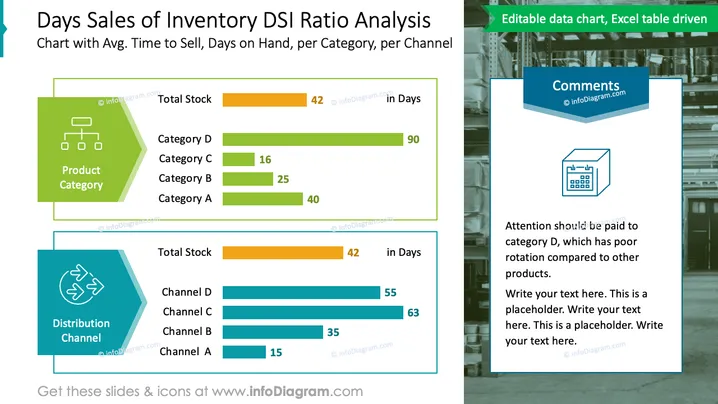
The slide presents an analysis of the Days Sales of Inventory (DSI) ratio, offering insights into the average time it takes to sell inventory categorized by product categories and distribution channels. It displays 'Total Stock in Days' for comparison, highlighting the performance of each category and channel. Product categories A, B, C, and D have varying days on hand, with Category D showing significantly higher days at 90, indicating slow turnover. Similarly, distribution channels A through D are compared, with Channel A demonstrating the best performance at 15 days.
Graphical Look
- The slide background features an industrial warehouse theme.
- Two main content blocks with a green and blue color theme respectively, each containing a horizontal bar chart.
- The first content block is labeled "Product Category" with an organizational chart icon.
- The second content block is labeled "Distribution Channel" with a circular arrows icon.
- Four bars in the product category chart indicating different categories, each with a numerical value and colored differently.
- Four bars in the distribution channel chart indicating different channels, each with a numerical value and in shades of blue.
- A commentary section on the right, titled "Comments," with a calendar icon, accompanied by placeholder text.
- A note at the top right corner of the slide stating "Editable data chart, Excel table driven."
The slide is visually organized with clear, distinct sections for product categories and distribution channels, complemented by a graphical warehouse backdrop that ties into the inventory theme. The use of color coding and horizontal bar charts facilitates quick comparison and analysis.
Use Cases
- Presenting inventory efficiency metrics during a business review or supply chain analysis meeting.
- Comparing product categories or distribution channels in terms of inventory turnover to stakeholders.
- Identifying areas for improvement in inventory management during strategy sessions.
- Including in a report to showcase how different segments of the business are performing in terms of sales and inventory.
How to Edit
How to edit text & colors

How to expand / shorten diagram

How to Replace Icons in infoDiagram PPT


