

Your graphics add a nice touch to my presentations and I recently used them for one of my all-hands meetings. Your toolbox adds professionalism to my slides. Instead of using standard clipart.
Claude Jones, Director of Engineer, @Walmartlabs, USA

Your graphics add a nice touch to my presentations and I recently used them for one of my all-hands meetings. Your toolbox adds professionalism to my slides. Instead of using standard clipart.
Claude Jones, Director of Engineer, @Walmartlabs, USA
I needed a fresh look at some of my slides. I've tried to find a way to create a paintbrush effect, to underline, accentuate, add some color and the handwritten markers were just the things. Very easy to use, easy to size, change the color. It was an affordable, perfect solution and I'm happy to recommend it.
Anonymous, US
The crisp, clean look of the graphics, and the fact that it allowed me to easily edit and change the colors to match the template was my main reason for purchasing them.
Brandie Jenkins, E-learning Developer, USA
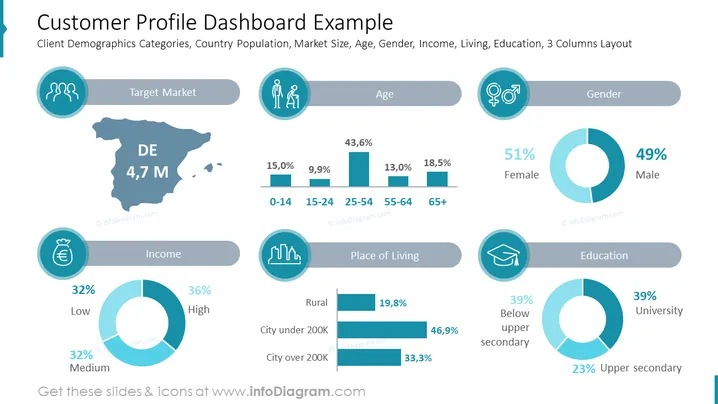
This PowerPoint slide is titled "Customer Profile Dashboard Example" and provides a visual representation of a client's demographic data with segments such as Target Market, Age, Gender, Income, Place of Living, and Education. Each category utilizes icons and graphical data representations like pie charts and bar graphs to deliver key statistics. For instance, the Age category breaks down the population by age groups, showing percentages for each, while the Gender category shows an almost even split between Female (51%) and Male (49%).
The overall look of the slide is sleek and modern, with a cohesive color palette and visual aids that facilitate the quick grasp of demographic data.



