Reviews
Your graphics add a nice touch to my presentations and I recently used them for one of my all-hands meetings. Your toolbox adds professionalism to my slides. Instead of using standard clipart.
I needed a fresh look at some of my slides. I've tried to find a way to create a paintbrush effect, to underline, accentuate, add some color and the handwritten markers were just the things. Very easy to use, easy to size, change the color. It was an affordable, perfect solution and I'm happy to recommend it.
The crisp, clean look of the graphics, and the fact that it allowed me to easily edit and change the colors to match the template was my main reason for purchasing them.
Description
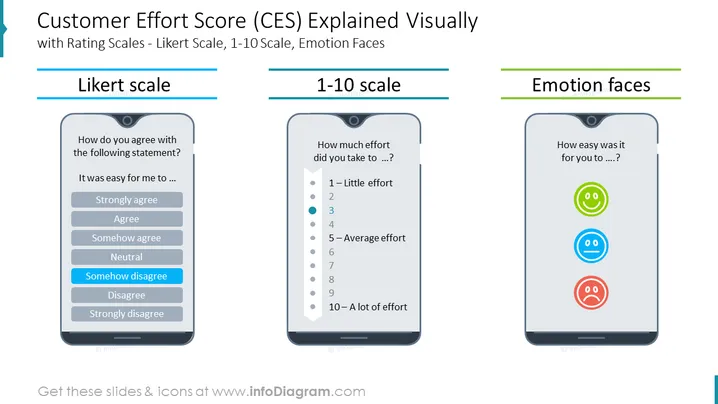
Customer Effort Score (CES) Explained Visually with Rating Scales - Likert Scale, 1-10 Scale, Emotion Faces
This PowerPoint slide provides a comprehensive overview of the Customer Effort Score (CES) metric, a key indicator of customer satisfaction and loyalty. The slide visually explains the three common rating scales used to measure CES: Likert scale, 1-10 scale, and emotion faces. This slide can be effectively utilized in business presentations to educate stakeholders about CES, showcase customer feedback data, and highlight strategies for improving customer experience.
What Does This Customer Effort Score (CES) Explained Visually with Rating Scales - Likert Scale, 1-10 Scale, Emotion Faces Slide Include?
- Three distinct sections, each dedicated to a specific rating scale: Likert scale, 1-10 scale, and emotion faces
- Clear and concise explanations of each rating scale, accompanied by visual mobile phone representations for easy comprehension
- Consistent color scheme throughout the slide, using shades of blue, gray, and white for a professional and cohesive look Simple yet informative icons representing the different rating options within each scale.
- Outline icons of a smiled face, neutral face, and sad face
This Customer Effort Score (CES) Explained Visually with Rating Scales - Likert Scale, 1-10 Scale, Emotion Faces Slide is a part of our Customer Experience Metrics Diagrams PPT Template.
How to Edit
How to edit text & colors

How to expand / shorten diagram

How to Replace Icons in infoDiagram PPT


