Reviews
Ihre Grafiken verleihen meinen Präsentationen eine nette Note, und ich habe sie kürzlich für eines meiner All-Hands-Meetings verwendet. Ihre Toolbox verleiht meinen Folien Professionalität, anstatt Standard-Clipart zu verwenden.
Ich brauchte einen neuen Blick auf einige meiner Folien. Ich habe versucht, einen Weg zu finden, einen Pinselschlag-Effekt zu erzielen, um zu unterstreichen, hervorzuheben, Farbe hinzuzufügen, und die handgeschriebenen Markierungen waren genau das Richtige. Sehr einfach zu bedienen, leicht in der Größe zu ändern, die Farbe zu ändern. Es war eine erschwingliche, perfekte Lösung und ich empfehle sie gerne weiter.
Die klare, saubere Optik der Grafiken und die Tatsache, dass ich die Farben leicht bearbeiten und an die Vorlage anpassen konnte, war mein Hauptgrund für den Kauf.
Description
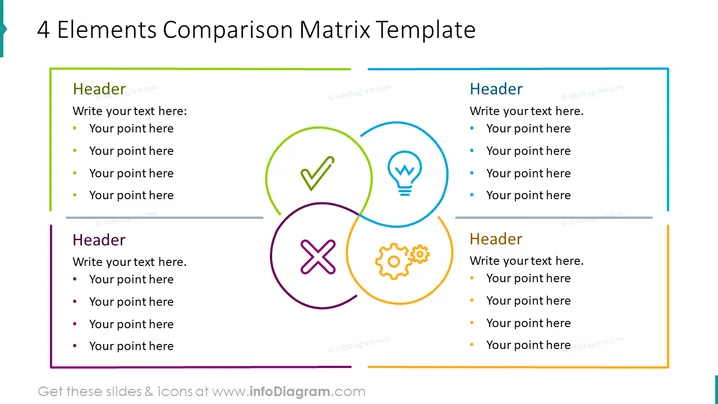
4 Elements Comparison Matrix Template
Slide Content
The slide presents a template for comparing four elements. Each quadrant represents a category or a criterion for comparison, signified by an icon: a checkmark, a lightbulb, a cogwheel, and an 'X' symbol. These icons might illustrate concepts like success, ideas/innovation, processes/systems, and challenges/negatives respectively. Accompanying each graphic is a text box with a "Header" placeholder, suggesting the title of the category, and four bullet points to list specifics or insights related to each category.
Graphical Look
- Four intersecting circles, each with a distinctive color outline: green, blue, orange, and purple.
- Each circle contains an icon that represents a concept: a checkmark, a lightbulb, a gear, and a cross.
- Above each circle is a text box with the word "Header" as a placeholder for the category title.
- A list of bullet points below each "Header" provides space to elaborate on each topic.
- The slide background is white, which contrasts with the vibrant colors of the graphical elements.
- Horizontal lines are placed below the text boxes, providing a visual separation and organizational structure to the slide.
The slide has a clean and professional design with a good use of white space to prevent overcrowding. The use of color helps to differentiate between the four concepts and makes the graphical elements stand out.
Use Cases
- In a business strategy presentation to compare different aspects of a project, such as strengths, weaknesses, opportunities, and threats (SWOT analysis).
- During a product development meeting to contrast features, benefits, challenges, and innovations of a new product.
- In a marketing presentation to compare competitive advantages or unique selling propositions across different market segments.
- As a visual tool in a training session to highlight varied approaches or methods, illustrating the most successful strategies versus least effective ones.
How to Edit
How to edit text & colors

How to expand / shorten diagram

How to Replace Icons in infoDiagram PPT


