Reviews
Sus gráficos añaden un toque agradable a mis presentaciones y recientemente los usé para una de mis reuniones generales. Su conjunto de herramientas añade profesionalismo a mis diapositivas. En lugar de usar imágenes prediseñadas estándar.
Necesitaba un aspecto fresco para algunas de mis diapositivas. Había intentado encontrar una forma de crear un efecto de pincel, de subrayar, acentuar, añadir algo de color y los marcadores escritos a mano fueron justo lo que necesitaba. Muy fácil de usar, fácil de ajustar el tamaño, cambiar el color. Fue una solución asequible y perfecta, y estoy feliz de recomendarla.
El aspecto nítido y limpio de los gráficos, y el hecho de que me permitiera editar y cambiar fácilmente los colores para que coincidieran con la plantilla fue mi principal razón para comprarlos.
Description
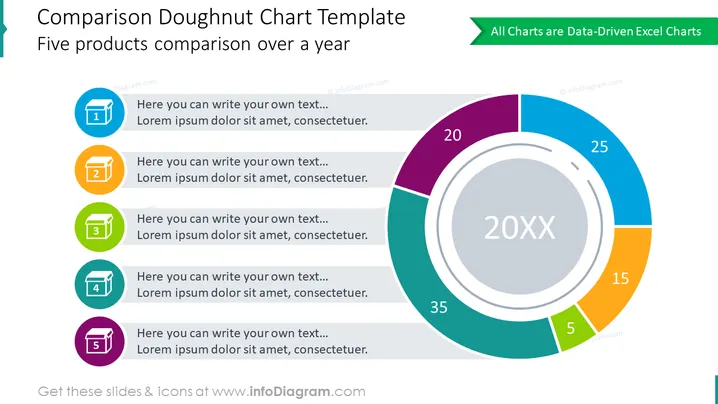
Comparison Doughnut Chart Template
Slide Content
The slide presents a comparative analysis tool titled "Comparison Doughnut Chart Template," focusing on the comparison of five products over a year. The chart shows percentage distributions for each product, indicating their proportion of a whole. Accompanying the chart are five numbered colored sections which likely represent data points or categories for each product. Each section includes a placeholder text suggesting where additional information could be filled in.
Graphical Look
- The slide's background is white, providing a clean and clear canvas for content.
- The title of the slide is at the top in dark text against a light background, enhancing readability.
- A vibrant, multicolored doughnut chart to the right captures attention, with differently sized segments in shades of purple, teal, blue, orange, and green.
- Numbers and percentage values are clearly displayed on the chart segments, emphasizing the quantitative nature of the comparison.
- To the left, there are five colorful icons in blue, orange, green, teal, and purple, each paired with a number from one to five, denoting categories or steps.
- Below each icon is a text box for customization, where presenters can add their informative texts related to each icon.
- At the top right, there's a green banner with white text stating "All Charts are Data-Driven Excel Charts," suggesting the chart's editable nature.
The slide is professionally designed, with a modern and functional aesthetic that balances visual interest and information clarity. The color choices are appealing and help to differentiate the data points.
Use Cases
- Presenting sales data for multiple products over a specific time frame to identify market trends or performance.
- Comparing the market share of different company products or services.
- Illustrating a breakdown of financials such as revenue or expenses by category for a business report.
- Analyzing customer or user segmentations in marketing presentations to highlight target demographics or behaviors.
How to Edit
How to edit text & colors

How to expand / shorten diagram

How to Replace Icons in infoDiagram PPT


