Reviews
Your slides are my 'secret sauce' when it comes to visualising my ideas to clients. I'm saving so much time.
InfoDiagram has been a wonderful resource since I found the product site a few years ago.
Your slides often generate good comments and ideas from my team that improve the final slides.
Description
Classification Model Challenges: Under-fitting, Optimal-fitting, Over-fitting
Slide Content
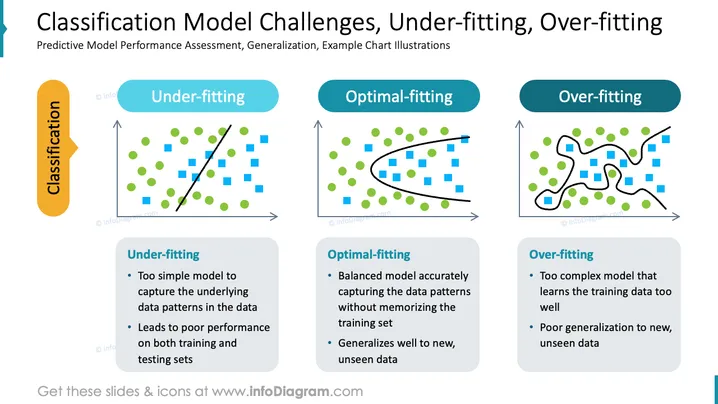
The PowerPoint slide focuses on the challenges of classification models in machine learning, emphasizing predictive model performance assessment and generalization with example chart illustrations. Under-fitting is described as a too simple model that fails to capture underlying data patterns, resulting in poor performance on training and testing datasets. Optimal-fitting represents a well-balanced model that accurately captures data patterns and generalizes effectively to new data. Over-fitting is characterized by a model that is too intricate, learning the training data excessively and failing to generalize to unfamiliar data.
Graphical Look
- The slide has a dark blue header bar with the slide title in white text.
- There are three main columns, each featuring a key concept: "Under-fitting", "Optimal-fitting", and "Over-fitting".
- Each column has a title banner in light blue with the concept name.
- The first column has a scatter plot with green circles and blue squares, and a straight black line suggesting a simple model.
- The second column's scatter plot includes a smoothly curved black line suggesting a balanced model fitting.
- The final column's scatter plot shows a highly complex wiggly black line, suggesting over-fitting.
- Beneath each graph, there's a textual explanation box corresponding to the concept: light grey for "Under-fitting", blue for "Optimal-fitting", and grey for "Over-fitting".
- The explanation boxes include bullet points elaborating on the meaning of each concept.
- On the slide's sides, two vertical, translucent text banners mention "Classification".
The overall look of the slide is clean, well-organized, and uses visual aids like charts, color-coded banners, and bullet points to convey complex statistical concepts simply and effectively.
Use Cases
- To educate teams on the importance of model accuracy and generalization in machine learning during internal training sessions.
- In academic settings, as part of a lecture on machine learning principles and model evaluation.
- For presenting research findings or methods in a data science conference or workshop.
- In a business context, to explain to stakeholders the challenges faced in predictive analytics and the importance of model selection.
How to Edit
How to edit text & colors

How to expand / shorten diagram

How to Replace Icons in infoDiagram PPT


