Reviews
Sus gráficos añaden un toque agradable a mis presentaciones y recientemente los usé para una de mis reuniones generales. Su conjunto de herramientas añade profesionalismo a mis diapositivas. En lugar de usar imágenes prediseñadas estándar.
Necesitaba un aspecto fresco para algunas de mis diapositivas. Había intentado encontrar una forma de crear un efecto de pincel, de subrayar, acentuar, añadir algo de color y los marcadores escritos a mano fueron justo lo que necesitaba. Muy fácil de usar, fácil de ajustar el tamaño, cambiar el color. Fue una solución asequible y perfecta, y estoy feliz de recomendarla.
El aspecto nítido y limpio de los gráficos, y el hecho de que me permitiera editar y cambiar fácilmente los colores para que coincidieran con la plantilla fue mi principal razón para comprarlos.
Description
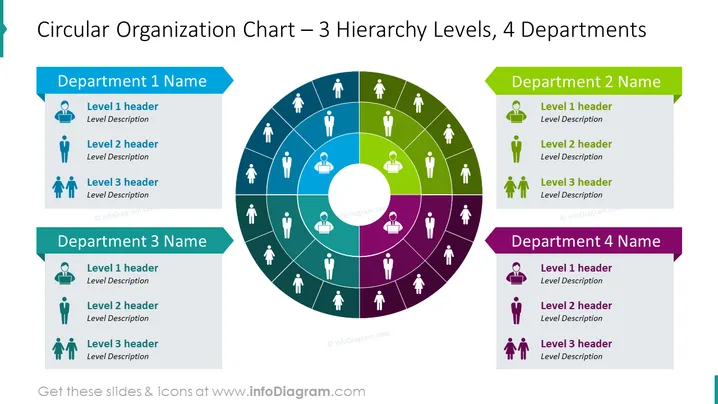
Circular Organization Chart – 3 Hierarchy Levels, 4 Departments
Slide Content
The slide presents a circular organizational chart that depicts 3 hierarchical levels within 4 distinct departments, each denoted by a different color. The departments are labeled as "Department 1 Name," "Department 2 Name," "Department 3 Name," and "Department 4 Name," corresponding to four-color coded segments (blue, green, teal, and purple) surrounding a central circular hub. Each department segment shows three levels: "Level 1 header," "Level 2 header," and "Level 3 header," with placeholders for level descriptions indicating a hierarchy from top to bottom levels.
Graphical Look
- The central feature is a large circular chart divided into four differently colored segments.
- Each segment represents a department and is shaded in a distinct color: blue, green, teal, or purple.
- In the central circle, there's a white circle that creates a donut-shaped diagram.
- Each departmental segment contains icons of a person with lines connecting to individual roles, visualizing the hierarchical structure.
- Color-coded banners are positioned adjacent to each department's segment, displaying the department's name.
- Within each department's segment, there are three smaller icons paired with text boxes for headers and descriptions.
The slide is colorful and uses both icons and text to create a visual hierarchy. The design is clean and professional, with a clear focus on delineating levels of responsibility and departmental divisions.
Use Cases
- Illustrating the structure of an organization during an internal company presentation.
- Displaying reporting relationships and departmental organization in a new employee orientation.
- Visualizing teams and hierarchies in proposals for organizational restructuring.
- Using it as part of a pitch to investors to explain company management and operational division.
How to Edit
How to edit text & colors

How to expand / shorten diagram

How to Replace Icons in infoDiagram PPT


