Reviews
Sus gráficos añaden un toque agradable a mis presentaciones y recientemente los usé para una de mis reuniones generales. Su conjunto de herramientas añade profesionalismo a mis diapositivas. En lugar de usar imágenes prediseñadas estándar.
Necesitaba un aspecto fresco para algunas de mis diapositivas. Había intentado encontrar una forma de crear un efecto de pincel, de subrayar, acentuar, añadir algo de color y los marcadores escritos a mano fueron justo lo que necesitaba. Muy fácil de usar, fácil de ajustar el tamaño, cambiar el color. Fue una solución asequible y perfecta, y estoy feliz de recomendarla.
El aspecto nítido y limpio de los gráficos, y el hecho de que me permitiera editar y cambiar fácilmente los colores para que coincidieran con la plantilla fue mi principal razón para comprarlos.
Description
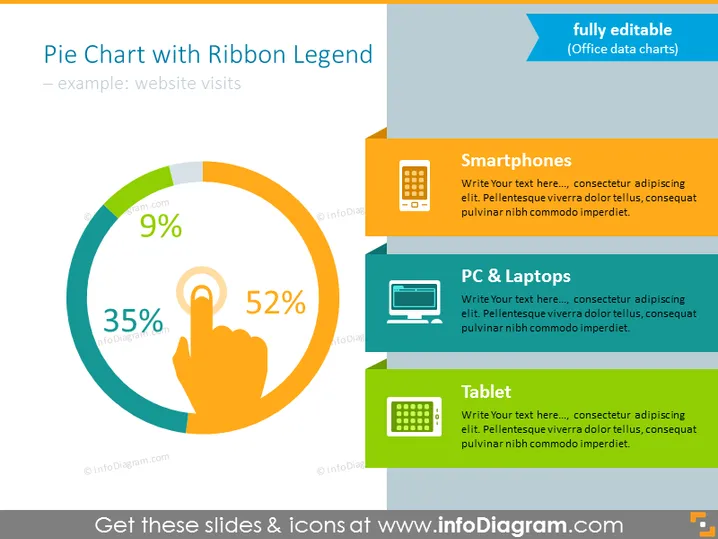
Pie Chart with Ribbon Legend
Slide Content
The slide displays a pie chart illustrating statistics for website visits, represented by three devices: Smartphones (52%), PC & Laptops (35%), and Tablet (9%). Each category is color-coded and accompanied by an icon that visualizes the type of device it denotes. The "Smartphones" segment indicates the most significant portion of website visits, suggesting the prevalence of mobile browsing. The "PC & Laptops" section represents a substantial but smaller part of the visits, while "Tablet" shows the least portion, indicating it's the least used device for accessing the website in this example.
Graphical Look
- A large pie chart dominates the left portion of the slide.
- Each segment of the chart is color-coded with percentage labels clearly displayed.
- A central icon of a hand clicking represents the action of visiting a website.
- To the right of the pie chart, a ribbon with matching colors provides the legend.
- Three icons, representing a smartphone, a PC monitor, and a tablet, are aligned next to the corresponding color in the legend.
- Each icon in the legend is connected to a text box for additional information or data interpretation.
- The layout is clear with ample white space around the graphical elements to avoid clutter.
The slide has a clean, modern look with bright contrasting colors that make the information stand out. The visual elements are well-organized, allowing for an easy understanding of the data presented.
Use Cases
- Presenting website traffic analytics in a marketing meeting.
- Demonstrating device usage statistics during a product development briefing.
- Use in a sales pitch to showcase the importance of mobile-responsiveness for websites.
- Including in a quarterly business review to highlight changes or trends in customer behavior.
How to Edit
How to edit text & colors

How to expand / shorten diagram

How to Replace Icons in infoDiagram PPT


