

Your graphics add a nice touch to my presentations and I recently used them for one of my all-hands meetings. Your toolbox adds professionalism to my slides. Instead of using standard clipart.
Claude Jones, Director of Engineer, @Walmartlabs, USA

Your graphics add a nice touch to my presentations and I recently used them for one of my all-hands meetings. Your toolbox adds professionalism to my slides. Instead of using standard clipart.
Claude Jones, Director of Engineer, @Walmartlabs, USA
I needed a fresh look at some of my slides. I've tried to find a way to create a paintbrush effect, to underline, accentuate, add some color and the handwritten markers were just the things. Very easy to use, easy to size, change the color. It was an affordable, perfect solution and I'm happy to recommend it.
Anonymous, US
The crisp, clean look of the graphics, and the fact that it allowed me to easily edit and change the colors to match the template was my main reason for purchasing them.
Brandie Jenkins, E-learning Developer, USA
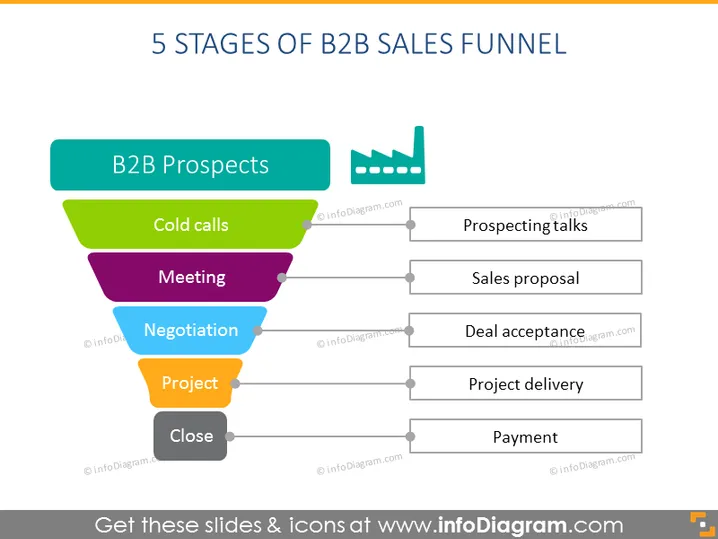
The slide outlines the "5 Stages of B2B Sales Funnel," starting with 'B2B Prospects' followed by 'Cold calls,' a stage where initial contact with potential clients is made. Next is 'Meeting,' where discussions and interest-building occur. The 'Negotiation' phase involves discussions on terms and pricing. The 'Project' step signifies entering into a formal engagement, and finally, the 'Close' stage marks the agreement and finalization of the sales process. To the right, there’s a process flow with steps: 'Prospecting talks,' then 'Sales proposal,' followed by 'Deal acceptance,' 'Project delivery,' and 'Payment,' representing the practical steps for advancing through the funnel.
The slide presents a clean and organized design with bright, distinct colors that aid in distinguishing between the different stages of the sales funnel. The contrast between the colorful funnel and the sleek, grey flowchart creates a visually engaging illustration of the process.



