Reviews
Your graphics add a nice touch to my presentations and I recently used them for one of my all-hands meetings. Your toolbox adds professionalism to my slides. Instead of using standard clipart.
I needed a fresh look at some of my slides. I've tried to find a way to create a paintbrush effect, to underline, accentuate, add some color and the handwritten markers were just the things. Very easy to use, easy to size, change the color. It was an affordable, perfect solution and I'm happy to recommend it.
The crisp, clean look of the graphics, and the fact that it allowed me to easily edit and change the colors to match the template was my main reason for purchasing them.
Description
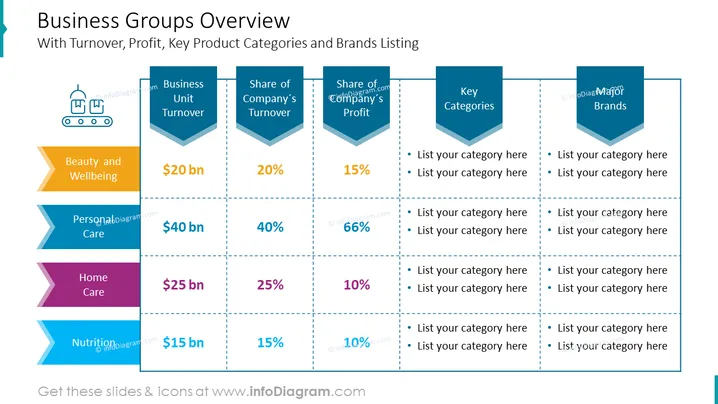
Business Groups Overview
With Turnover, Profit, Key Product Categories and Brands Listing
Slide Content
The "Business Groups Overview" slide presents an analysis of a company's business units by providing data on turnover, profit, product categories, and major brands associated with each unit. There are four main categories: Beauty and Wellbeing, Personal Care, Home Care, and Nutrition. The slide allows for specific figures to be assigned to each unit's turnover and their respective shares in company turnover and profit. It encourages the listing of key product categories and brands under each business unit. This structured format facilitates a comprehensive view of how each unit contributes to the company's financial health and market presence.
Graphical Look
- The slide title is in a large, bold, dark blue font at the top.
- Four horizontal sections represent different business units, each with a unique color: yellow, blue, purple, and green.
- Each section features a ribbon banner with the business unit's name.
- Turnover is indicated with a large, bold dollar figure beneath the unit name.
- Share of company turnover and company’s profit percentage are displayed in descending blue chevrons next to each other.
- Two additional blue chevrons per unit are designated for listing key categories and major brands, all with placeholder text.
- Vertical and horizontal dashed lines create a grid-like layout, separating each unit's data points.
The overall look of the slide is a clean, organized chart-like format with a business-professional color palette.
Use Cases
- Presenting an overview of a company's diverse business units during an annual general meeting.
- Analyzing business unit performance in a strategic planning session.
- Sharing company structure and financial highlights in an investor relations presentation.
- Showcasing company portfolio during a marketing strategy meeting.
How to Edit
How to edit text & colors

How to expand / shorten diagram

How to Replace Icons in infoDiagram PPT


