Reviews
Your graphics add a nice touch to my presentations and I recently used them for one of my all-hands meetings. Your toolbox adds professionalism to my slides. Instead of using standard clipart.
I needed a fresh look at some of my slides. I've tried to find a way to create a paintbrush effect, to underline, accentuate, add some color and the handwritten markers were just the things. Very easy to use, easy to size, change the color. It was an affordable, perfect solution and I'm happy to recommend it.
The crisp, clean look of the graphics, and the fact that it allowed me to easily edit and change the colors to match the template was my main reason for purchasing them.
Description
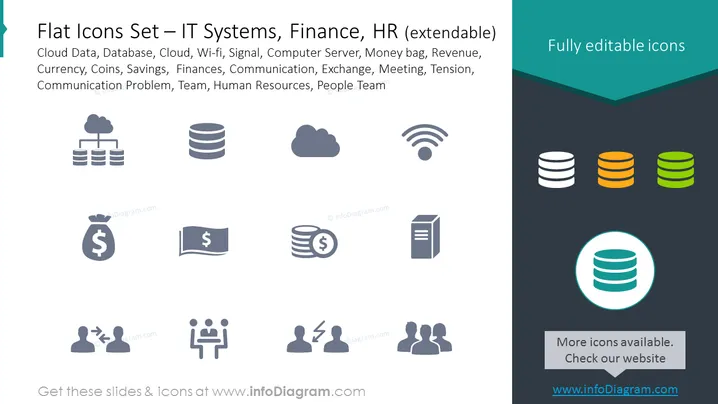
Flat Icons Set – IT Systems, Finance, HR (extendable)
Slide Content
The PowerPoint slide is titled "Flat Icons Set – IT Systems, Finance, HR (extendable)" and showcases a variety of icons representing different concepts. Cloud Data illustrates cloud storage or computing capabilities. Database denotes data storage and management systems. Cloud symbolizes internet-based computing services. Wi-fi implies wireless networking technology. Signal represents connectivity strength or data transmission. Computer Server points to powerful computers managing network resources. Money bag, Revenue, Currency, Coins, and Savings refer to various financial aspects. Finances cover the management of money. Communication indicates the exchange of information. Exchange suggests trading or currency conversion. Meeting signifies a gathering for discussion. Tension highlights stress or strain in a context. Communication Problem suggests challenges in exchanging information. Team and Human Resources are about workforce management and collaboration.
Graphical Look
- The icons are arranged in a clear grid layout of three rows and four columns.
- Each icon is minimalist, flat-designed, and monochromatic, set against a contrasted background.
- The icons' colors are shades of grey, except for the last column, which contains colored icons in shades of green and a highlighted one in teal with a white stroke.
- The top right corner has a text box with the phrase "Fully editable icons" set against a darker background with an arrow pointing towards the icons.
- The background of the slide is muted, with a teal-colored title bar at the top and a lighter shade for the icon area.
- The slide utilizes a mix of filled and outlined circles to demonstrate the various states (e.g., filled for Database, outlined for Wi-fi) that can be used when editing the icons.
The overall look of the slide is modern and professional with a simple color scheme that ensures focus on the individual icons. The design allows for easy interpretation of the symbols and ensures that they can be quickly identified as related to IT, Finance or HR.
Use Cases
- To represent different business concepts in corporate presentations.
- When explaining IT infrastructure, financial operations, or human resources processes visually.
- As part of educational materials for training employees on various company systems and departments.
- For enhancing the visual appeal and comprehension of reports or proposals that are submitted to stakeholders or clients.
How to Edit
How to edit text & colors

How to expand / shorten diagram

How to Replace Icons in infoDiagram PPT


