

Your graphics add a nice touch to my presentations and I recently used them for one of my all-hands meetings. Your toolbox adds professionalism to my slides. Instead of using standard clipart.
Claude Jones, Director of Engineer, @Walmartlabs, USA

Your graphics add a nice touch to my presentations and I recently used them for one of my all-hands meetings. Your toolbox adds professionalism to my slides. Instead of using standard clipart.
Claude Jones, Director of Engineer, @Walmartlabs, USA
I needed a fresh look at some of my slides. I've tried to find a way to create a paintbrush effect, to underline, accentuate, add some color and the handwritten markers were just the things. Very easy to use, easy to size, change the color. It was an affordable, perfect solution and I'm happy to recommend it.
Anonymous, US
The crisp, clean look of the graphics, and the fact that it allowed me to easily edit and change the colors to match the template was my main reason for purchasing them.
Brandie Jenkins, E-learning Developer, USA
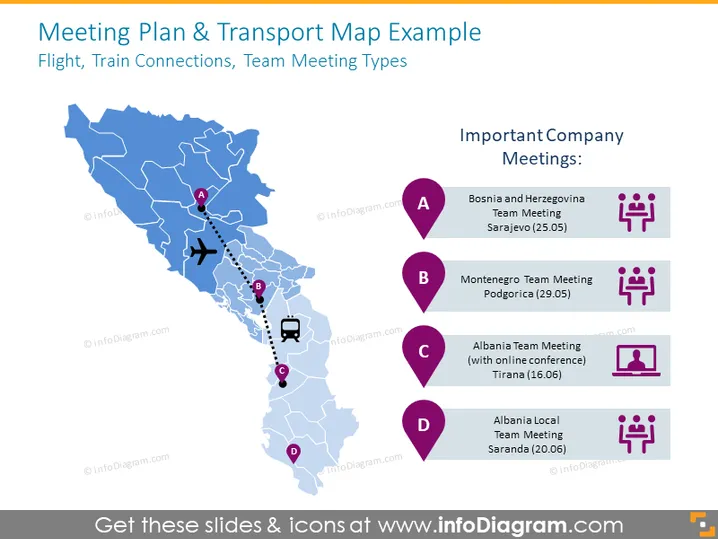
Flight, Train Connections, Team Meeting Types
The slide is titled "Meeting Plan & Transport Map Example" and displays a map illustrating various locations with corresponding team meeting details. Each point is marked with "A", "B", "C", and "D", signifying different meetings. For instance, "A" indicates a team meeting in Sarajevo, Bosnia, and Herzegovina on 25.05, while "B" represents a team meeting in Podgorica, Montenegro on 29.05. "C" depicts an Albania team meeting with an online conference in Tirana on 16.06, and "D" shows an Albania local team meeting in Saranda on 20.06. These items provide clarity on the type and location of each gathering.
The slide utilizes a balanced mix of text and icons to convey information visually. The color contrast between the map and the markers is clear and aids in distinguishing different meeting points and types.



