Reviews
Your graphics add a nice touch to my presentations and I recently used them for one of my all-hands meetings. Your toolbox adds professionalism to my slides. Instead of using standard clipart.
I needed a fresh look at some of my slides. I've tried to find a way to create a paintbrush effect, to underline, accentuate, add some color and the handwritten markers were just the things. Very easy to use, easy to size, change the color. It was an affordable, perfect solution and I'm happy to recommend it.
The crisp, clean look of the graphics, and the fact that it allowed me to easily edit and change the colors to match the template was my main reason for purchasing them.
Description
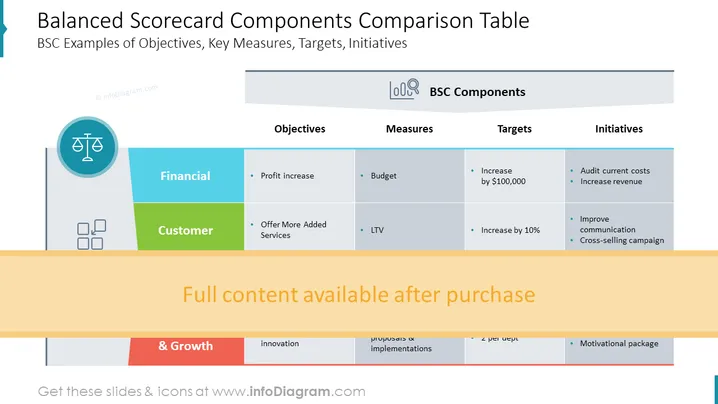
Balanced Scorecard Components Comparison Table
Slide Content
This PowerPoint slide presents a Balanced Scorecard (BSC) Components Comparison Table, focusing on different aspects such as Financial and Customer perspectives. Under Financial, the objectives include a profit increase, and corresponding measures like budgeting are mentioned, along with a target of increasing by $100,000 and initiatives such as auditing current costs and increasing revenue. For the Customer section, the objective is to offer more added services, measured by LTV (Lifetime Value), with a target to increase by 10%, and initiatives like improving communication and a cross-selling campaign.
Graphical Look
- The slide has a clear and structured layout with a blue and green color scheme.
- At the top of the slide is the title in bold, large font size.
- There is a sidebar on the left with iconography, such as a scale symbol representing balance.
- Four main content areas are divided into labeled columns: Objectives, Measures, Targets, and Initiatives.
- Each column has a different shade of blue or green, creating visual segmentation.
- Bullet points are used to organize and list items under each column header.
- There are transparent overlays with text indicating that full content is available after purchase.
The overall look of the slide is professional and organized, utilizing color coding to distinguish different categories and iconography to enhance visual understanding. The structured layout facilitates quick comprehension of complex business concepts.
Use Cases
- This slide can be used in business strategy meetings to present and discuss performance objectives and their alignment with organizational goals.
- It's suitable for annual or quarterly reviews to assess progress against key performance indicators (KPIs) and financial targets.
- Useful in training sessions to explain the concept of Balanced Scorecard to employees or stakeholders.
- Ideal for management presentations that aim to outline action plans and initiatives based on measured targets and objectives.
How to Edit
How to edit text & colors

How to expand / shorten diagram

How to Replace Icons in infoDiagram PPT


