Reviews
Your graphics add a nice touch to my presentations and I recently used them for one of my all-hands meetings. Your toolbox adds professionalism to my slides. Instead of using standard clipart.
I needed a fresh look at some of my slides. I've tried to find a way to create a paintbrush effect, to underline, accentuate, add some color and the handwritten markers were just the things. Very easy to use, easy to size, change the color. It was an affordable, perfect solution and I'm happy to recommend it.
The crisp, clean look of the graphics, and the fact that it allowed me to easily edit and change the colors to match the template was my main reason for purchasing them.
Description
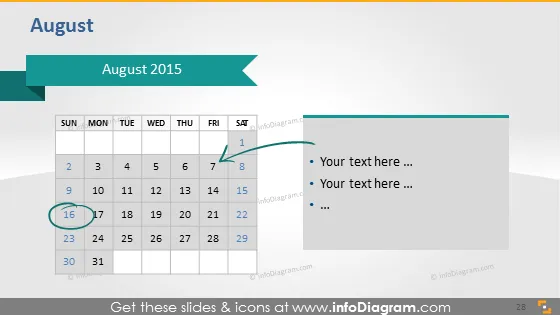
August 2015
Slide Content
The PowerPoint slide titled "August 2015" features a calendar for the month of August, indicating the days and dates. Highlighted are two dates: 1st August, which falls on a Saturday, and 16th August, falling on a Sunday, suggesting special events or milestones. Alongside the calendar, there are bullet points where a presenter can add relevant text, possibly describing the events on the highlighted dates or other important notes for the month.
Graphical Look
- A large calendar grid occupying most of the slide, with rows for weeks and columns for days.
- The title "August 2015" prominently displayed at the top in a large font.
- Two arrows flanking the title, pointing towards it, drawing attention to the month's significance.
- Two dates, the 1st and 16th of August, circled in teal, indicating their importance.
- Three bullet points to the right of the calendar offer space for text input.
- A subtle shadow effect appears beneath the right arrow.
- The color scheme includes shades of grey for the calendar, with teal accents for highlighting.
The overall look is clean and modern, with a clear emphasis on the highlighted dates. The slide is visually well-organized, with a good balance of text and graphical elements, providing a functional and aesthetically pleasing design.
Use Cases
- To outline key dates for company milestones, product launches, or deadlines in a business presentation.
- To highlight important company events or holidays in an internal company meeting.
- To facilitate project planning by showcasing the target dates for project phases or deliverables.
- To provide a visual aid during a sales presentation to indicate special promotion or sales event dates.
How to Edit
How to edit text & colors

How to expand / shorten diagram

How to Replace Icons in infoDiagram PPT


