Reviews
Ihre Grafiken verleihen meinen Präsentationen eine nette Note, und ich habe sie kürzlich für eines meiner All-Hands-Meetings verwendet. Ihre Toolbox verleiht meinen Folien Professionalität, anstatt Standard-Clipart zu verwenden.
Ich brauchte einen neuen Blick auf einige meiner Folien. Ich habe versucht, einen Weg zu finden, einen Pinselschlag-Effekt zu erzielen, um zu unterstreichen, hervorzuheben, Farbe hinzuzufügen, und die handgeschriebenen Markierungen waren genau das Richtige. Sehr einfach zu bedienen, leicht in der Größe zu ändern, die Farbe zu ändern. Es war eine erschwingliche, perfekte Lösung und ich empfehle sie gerne weiter.
Die klare, saubere Optik der Grafiken und die Tatsache, dass ich die Farben leicht bearbeiten und an die Vorlage anpassen konnte, war mein Hauptgrund für den Kauf.
Description
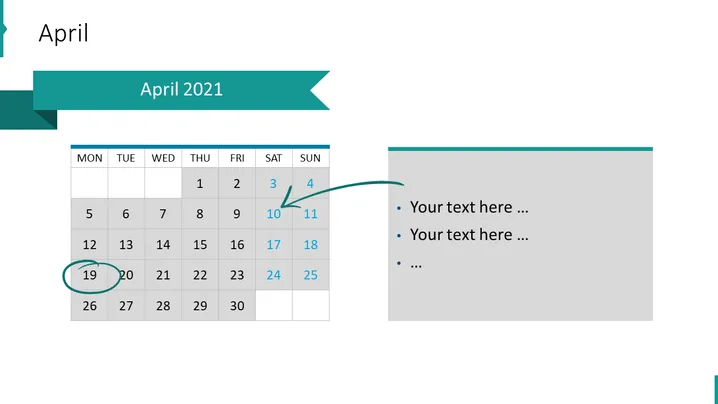
April 2021
Slide Content
The PowerPoint slide displays a calendar for the month of April 2021. The presented month is arranged in a standard grid format with the days of the week labeled from Monday to Sunday, and the dates in individual cells. The calendar highlights two specific dates, the 10th and the 19th, with corresponding arrows pointing to a text box to the right side. These arrows imply that there are events or notes associated with these dates, though the slide template uses placeholder text, "Your text here …", inviting the presenter to customize the content.
Graphical Look
- The slide background is plain white.
- An elongated teal banner running across the top contains the word "April" in large, white, sans-serif font.
- The calendar itself is on the left half of the slide, with a teal header row for the days of the week.
- The current month and year "April 2021" are displayed in a slightly darker teal ribbon that overlaps the top banner.
- Each date on the calendar is presented in a light gray cell, with weekend dates in a darker shade.
- Two dates, the 10th and the 19th, are highlighted by larger green circles and are connected by green arrows to the right text box.
- The text box to the right has a light gray background and a teal stripe across the top, mirroring the color scheme of the rest of the slide. It contains bullet points for adding corresponding notes to the dates highlighted in the calendar.
The overall look of the slide is clean and professional with a cohesive color scheme of teal and gray, designed to emphasize specific dates and associated notes.
Use Cases
- Planning and outlining key events or deadlines in a monthly business meeting.
- Summarizing important project milestones or deliverables during a team presentation.
- Organizing and sharing a schedule for a corporate event or conference with stakeholders.
- Demonstrating the timeline of a marketing campaign and associated tasks during a strategic planning session.
How to Edit
How to edit text & colors

How to expand / shorten diagram

How to Replace Icons in infoDiagram PPT


