Reviews
Your graphics add a nice touch to my presentations and I recently used them for one of my all-hands meetings. Your toolbox adds professionalism to my slides. Instead of using standard clipart.
I needed a fresh look at some of my slides. I've tried to find a way to create a paintbrush effect, to underline, accentuate, add some color and the handwritten markers were just the things. Very easy to use, easy to size, change the color. It was an affordable, perfect solution and I'm happy to recommend it.
The crisp, clean look of the graphics, and the fact that it allowed me to easily edit and change the colors to match the template was my main reason for purchasing them.
Description
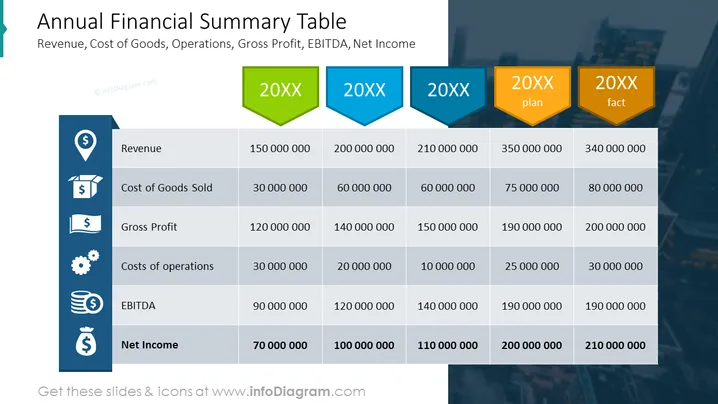
##Annual Financial Summary Table Slide Description It's a dedicated template of a table to present annual financial data like:
- revenue
- cost of goods sold
- gross profit
- costs of operations
- EBITDA
- net income
through the years including plans and facts' results. Each of the parameters is symbolized with an adequate icon.
##Annual Financial Summary Table Slide Description revenue, cost of goods sold, gross profit, costs of operations, EBITDA, net income, years, plan, fact, icons, table template, picture background. The whole table can be fully modified in PowerPoint.
How to Edit
How to edit text & colors

How to expand / shorten diagram

How to Replace Icons in infoDiagram PPT


