Reviews
Sus gráficos añaden un toque agradable a mis presentaciones y recientemente los usé para una de mis reuniones generales. Su conjunto de herramientas añade profesionalismo a mis diapositivas. En lugar de usar imágenes prediseñadas estándar.
Necesitaba un aspecto fresco para algunas de mis diapositivas. Había intentado encontrar una forma de crear un efecto de pincel, de subrayar, acentuar, añadir algo de color y los marcadores escritos a mano fueron justo lo que necesitaba. Muy fácil de usar, fácil de ajustar el tamaño, cambiar el color. Fue una solución asequible y perfecta, y estoy feliz de recomendarla.
El aspecto nítido y limpio de los gráficos, y el hecho de que me permitiera editar y cambiar fácilmente los colores para que coincidieran con la plantilla fue mi principal razón para comprarlos.
Description
Alternative Solution Analysis
Slide Content
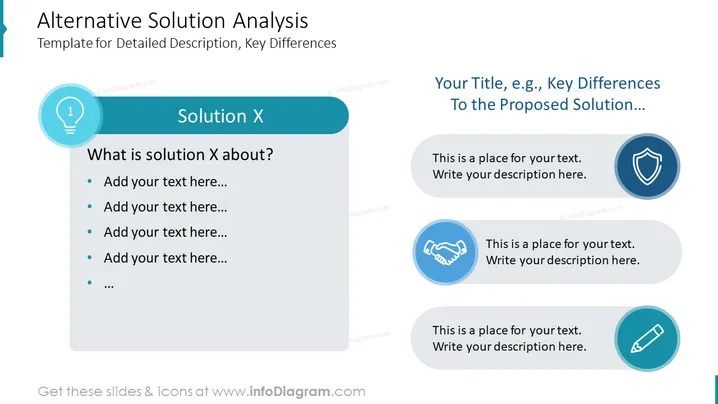
The slide is titled "Alternative Solution Analysis" and is a template for providing a detailed description and key differences of solutions. It has two main sections: on the left, "Solution X" with a light bulb icon indicating an idea or solution, and several bullet points for adding a description. On the right, there is a heading "Your Title, e.g., Key Differences To the Proposed Solution..." with three bullet points, each accompanied by an icon—a shield, a handshake, and a pencil—suggesting protection, agreement, and writing or editing respectively.
Graphical Look
- The slide background is white with two major content blocks separated by ample space.
- The left block has a dark teal header with a circular light bulb icon and numbered list "1" encased in a lighter teal circle.
- Bullet points for adding text are indicated with standard bullet graphics on a lighter background.
- The right block has a gray header where the title can be added and three rounded rectangular shapes beneath it of varying shades of gray to blue, each housing an icon and place for text.
- The icons used are a shield, handshake, and pencil, colored in white and set against different shades of blue circular backgrounds.
- The textual elements employ a sans-serif font that is clear and modern.
The slide design is clean and balanced, with contrasting colors that distinguish each section and draw attention to the key elements. The use of icons provides a visual shorthand to represent ideas and concepts.
Use Cases
- In strategic business meetings to describe and compare competitive products or services.
- During project planning sessions to evaluate different methodologies or processes.
- As part of a proposal to outline the benefits and features of a proposed solution versus alternatives.
- Within training or educational settings to explain divergent approaches to a problem-solving scenario.
How to Edit
How to edit text & colors

How to expand / shorten diagram

How to Replace Icons in infoDiagram PPT


