Reviews
Sus gráficos añaden un toque agradable a mis presentaciones y recientemente los usé para una de mis reuniones generales. Su conjunto de herramientas añade profesionalismo a mis diapositivas. En lugar de usar imágenes prediseñadas estándar.
Necesitaba un aspecto fresco para algunas de mis diapositivas. Había intentado encontrar una forma de crear un efecto de pincel, de subrayar, acentuar, añadir algo de color y los marcadores escritos a mano fueron justo lo que necesitaba. Muy fácil de usar, fácil de ajustar el tamaño, cambiar el color. Fue una solución asequible y perfecta, y estoy feliz de recomendarla.
El aspecto nítido y limpio de los gráficos, y el hecho de que me permitiera editar y cambiar fácilmente los colores para que coincidieran con la plantilla fue mi principal razón para comprarlos.
Description
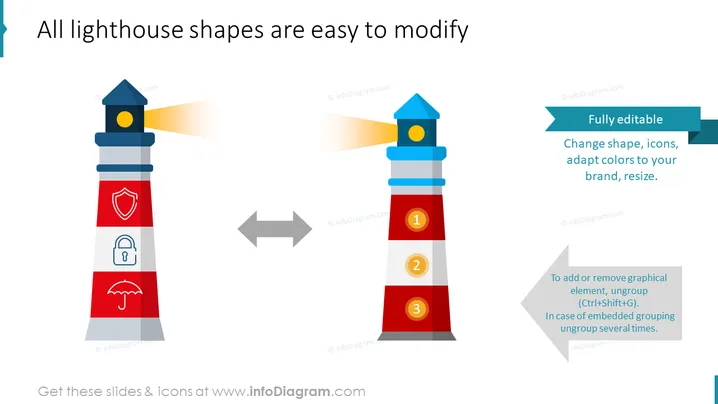
All lighthouse shapes are easy to modify
Slide Content
The PowerPoint slide focuses on the customizability of lighthouse-shaped graphics, stressing their ease of modification. A lighthouse with icons representing security (shield), privacy (lock), and coverage (umbrella) signifies different operational layers or areas. Arrows point towards a modified lighthouse with numerical labels, suggesting the transformation or simplification of concepts into steps. Additional text reinforces the graphics' adaptability—ranging from color and size alterations to icon changes, aligning with specific branding requirements.
Graphical Look
- Two stylized lighthouse graphics are located on the left and right sides of the slide.
- The left lighthouse features a light beam and three icons: a shield, a lock, and an umbrella, each set against a red and grey color-blocked background.
- The right lighthouse contains colored numerical badges (1, 2, 3) instead of icons, displaying a sequential transformation.
- A double-sided horizontal arrow in grey is placed between the two lighthouses, indicating the possibility or action of change.
- Rectangular speech bubbles in teal, containing explanatory text, are oriented towards the right lighthouse, appearing to emerge from its edges.
- A light grey arrow with instructional text is positioned beneath the right lighthouse, providing guidance on modifying the graphics.
The slide has a clean, colorful, and professional design with a strong visual metaphor of transformation and adaptability. The use of clear icons, contrasting colors, and easy-to-follow arrows guides the viewer through the concept of customization.
Use Cases
- Showcasing the flexibility of business models or strategies in a visually engaging way.
- Demonstrating stages of project development or transformation in training or educational materials.
- Highlighting customization options for products or services in marketing presentations.
- Using visual metaphors to explain complex systems or processes in a simplified, step-by-step format.
How to Edit
How to edit text & colors

How to expand / shorten diagram

How to Replace Icons in infoDiagram PPT


