

Your graphics add a nice touch to my presentations and I recently used them for one of my all-hands meetings. Your toolbox adds professionalism to my slides. Instead of using standard clipart.
Claude Jones, Director of Engineer, @Walmartlabs, USA

Your graphics add a nice touch to my presentations and I recently used them for one of my all-hands meetings. Your toolbox adds professionalism to my slides. Instead of using standard clipart.
Claude Jones, Director of Engineer, @Walmartlabs, USA
I needed a fresh look at some of my slides. I've tried to find a way to create a paintbrush effect, to underline, accentuate, add some color and the handwritten markers were just the things. Very easy to use, easy to size, change the color. It was an affordable, perfect solution and I'm happy to recommend it.
Anonymous, US
The crisp, clean look of the graphics, and the fact that it allowed me to easily edit and change the colors to match the template was my main reason for purchasing them.
Brandie Jenkins, E-learning Developer, USA
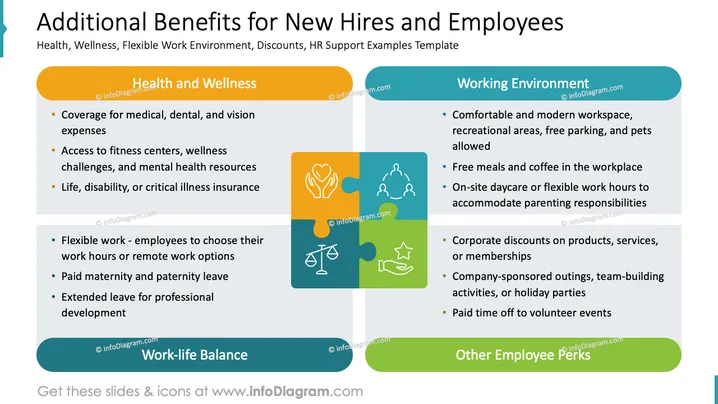
The PowerPoint slide titled "Additional Benefits for New Hires and Employees" includes a list of various benefits divided into three categories: Health and Wellness, offering coverage and resources for medical, dental, vision, fitness, mental health, and insurance. Work-life Balance emphasizes flexibility in work location and hours, as well as parental leave and development opportunities. Other Employee Perks highlight the importance of a comfortable work environment, meals and coffee, daycare, corporate discounts, company events, and volunteer time.
The overall look of the slide is clean and professional, with good use of color to differentiate sections. The icons and puzzle pieces serve as a visual representation of how different benefits contribute to the overall employee experience.



