

Your graphics add a nice touch to my presentations and I recently used them for one of my all-hands meetings. Your toolbox adds professionalism to my slides. Instead of using standard clipart.
Claude Jones, Director of Engineer, @Walmartlabs, USA

Your graphics add a nice touch to my presentations and I recently used them for one of my all-hands meetings. Your toolbox adds professionalism to my slides. Instead of using standard clipart.
Claude Jones, Director of Engineer, @Walmartlabs, USA
I needed a fresh look at some of my slides. I've tried to find a way to create a paintbrush effect, to underline, accentuate, add some color and the handwritten markers were just the things. Very easy to use, easy to size, change the color. It was an affordable, perfect solution and I'm happy to recommend it.
Anonymous, US
The crisp, clean look of the graphics, and the fact that it allowed me to easily edit and change the colors to match the template was my main reason for purchasing them.
Brandie Jenkins, E-learning Developer, USA
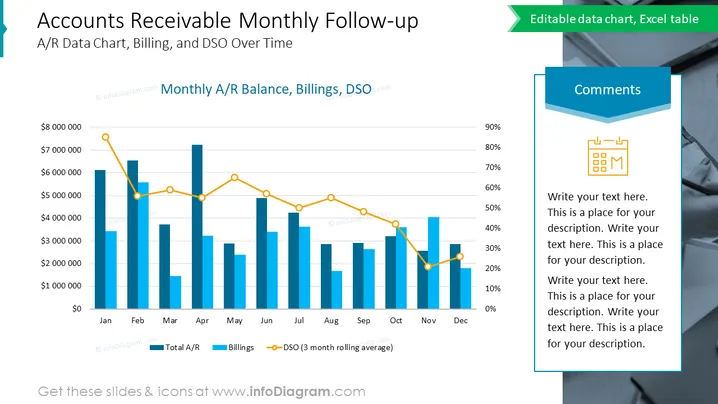
The PowerPoint slide presents data on Accounts Receivable (A/R) tracking over a year, specifically detailing a monthly follow-up. It informs viewers about A/R, Billings, and Days Sales Outstanding (DSO) trends over time. Total A/R is shown through a bar graph indicating the monetary value per month. Billings are likely represented similarly, signifying the revenue from invoicing within the same timeframe. DSO, a key performance indicator to understand the effectiveness of a company’s credit and collection efforts, is depicted with a line graph using a three-month rolling average to smooth out short-term variations.
The overall look of the slide is clean and professional, with a clear distinction between visual elements, enabling viewers to grasp the data efficiently.



