Reviews
Sus gráficos añaden un toque agradable a mis presentaciones y recientemente los usé para una de mis reuniones generales. Su conjunto de herramientas añade profesionalismo a mis diapositivas. En lugar de usar imágenes prediseñadas estándar.
Necesitaba un aspecto fresco para algunas de mis diapositivas. Había intentado encontrar una forma de crear un efecto de pincel, de subrayar, acentuar, añadir algo de color y los marcadores escritos a mano fueron justo lo que necesitaba. Muy fácil de usar, fácil de ajustar el tamaño, cambiar el color. Fue una solución asequible y perfecta, y estoy feliz de recomendarla.
El aspecto nítido y limpio de los gráficos, y el hecho de que me permitiera editar y cambiar fácilmente los colores para que coincidieran con la plantilla fue mi principal razón para comprarlos.
Description
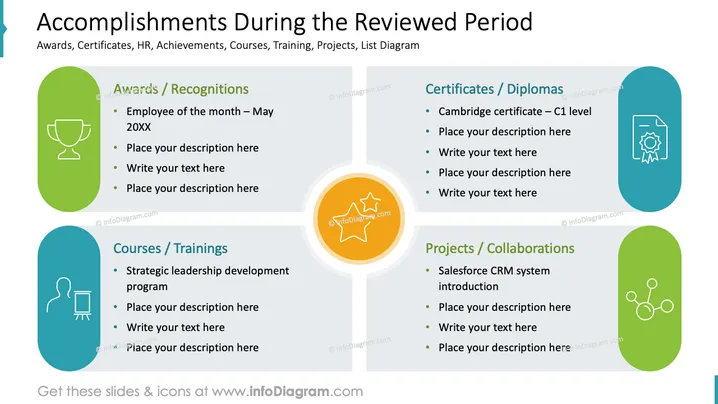
Accomplishments During the Reviewed Period
Slide Content
The PowerPoint slide titled "Accomplishments During the Reviewed Period" is divided into four sections: "Awards / Recognitions," "Certificates / Diplomas," "Courses / Trainings," and "Projects / Collaborations." Each section lists items that signify the accomplishments, such as "Employee of the month – May 20XX," "Cambridge certificate – C1 level," "Strategic leadership development program," and "Salesforce CRM system introduction," suggesting that the slide is used to showcase various accomplishments in a professional or educational context.
Graphical Look
- The slide has a blue background with a white central column dividing it into two halves.
- On the left, two rounded-rectangle placeholders colored in green and blue contain icons and text for "Awards / Recognitions" and "Courses / Trainings" respectively.
- On the right, another set of rounded-rectangle placeholders are present in blue and green for "Certificates / Diplomas" and "Projects / Collaborations."
- Each section features a distinct icon - a trophy for Awards, a certificate for Certificates, a blackboard for Courses, and interconnected circles for Projects.
- The icons are white, adding contrast against the colored placeholders.
- Beneath each section title is a bulleted list where descriptions can be added.
The slide is neatly organized with a balanced use of space and color. Icons are simple and effectively communicate the theme of each category.
Use Cases
- Presenting an individual's or team's achievements in a corporate annual review.
- Showcasing professional development efforts in a training or educational setting.
- Highlighting key milestones or certifications during a project wrap-up or review meeting.
- Including in a personal portfolio presentation as part of a job application or interview process.
How to Edit
How to edit text & colors

How to expand / shorten diagram

How to Replace Icons in infoDiagram PPT


