Reviews
Your graphics add a nice touch to my presentations and I recently used them for one of my all-hands meetings. Your toolbox adds professionalism to my slides. Instead of using standard clipart.
I needed a fresh look at some of my slides. I've tried to find a way to create a paintbrush effect, to underline, accentuate, add some color and the handwritten markers were just the things. Very easy to use, easy to size, change the color. It was an affordable, perfect solution and I'm happy to recommend it.
The crisp, clean look of the graphics, and the fact that it allowed me to easily edit and change the colors to match the template was my main reason for purchasing them.
Description
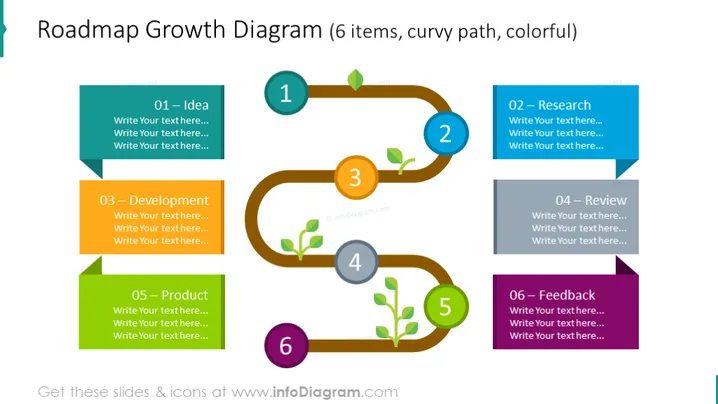
Roadmap Growth Diagram (6 items, curvy path, colorful)
Slide Content:
This slide portrays a vibrant and dynamic growth roadmap, broken down into six distinct stages: "01 – Idea," "02 – Research," "03 – Development," "04 – Review," "05 – Product," and "06 – Feedback." Each phase is crucial to the lifecycle of a project or product, beginning with the conception of an idea, followed by thorough research, the development phase where the idea begins to materialize, a review process for quality assurance, the final product stage, and finally, the collection of feedback for future improvements.
Graphical Look:
- A curvy, brown path that snakes across the slide, connecting six circular nodes.
- Each node is filled with a number and corresponding leaf icon, increasing from 1 to 6.
- The nodes are connected by the path which loops around each node, emphasizing continuity.
- Colorful banner-like text boxes in teal, blue, green, grey, lime green, and purple are adjacent to each node for text insertion.
The numbers within the nodes are encircled by a thin line, with the color matching the adjacent text box. The overall design is colorful and engaging, using a mix of cool and warm tones to differentiate the stages on the roadmap. The use of a winding path suggests flexibility and continuous development.
Use Cases:
- In strategic planning meetings to outline the stages of business growth or project development.
- For product development presentations to show the journey from ideation to market feedback.
- In educational settings to teach the process of systematic project execution.
- During team briefings to review progress and plan next steps in a project timeline.
How to Edit
How to edit text & colors

How to expand / shorten diagram

How to Replace Icons in infoDiagram PPT


