

Your graphics add a nice touch to my presentations and I recently used them for one of my all-hands meetings. Your toolbox adds professionalism to my slides. Instead of using standard clipart.
Claude Jones, Director of Engineer, @Walmartlabs, USA

Your graphics add a nice touch to my presentations and I recently used them for one of my all-hands meetings. Your toolbox adds professionalism to my slides. Instead of using standard clipart.
Claude Jones, Director of Engineer, @Walmartlabs, USA
I needed a fresh look at some of my slides. I've tried to find a way to create a paintbrush effect, to underline, accentuate, add some color and the handwritten markers were just the things. Very easy to use, easy to size, change the color. It was an affordable, perfect solution and I'm happy to recommend it.
Anonymous, US
The crisp, clean look of the graphics, and the fact that it allowed me to easily edit and change the colors to match the template was my main reason for purchasing them.
Brandie Jenkins, E-learning Developer, USA
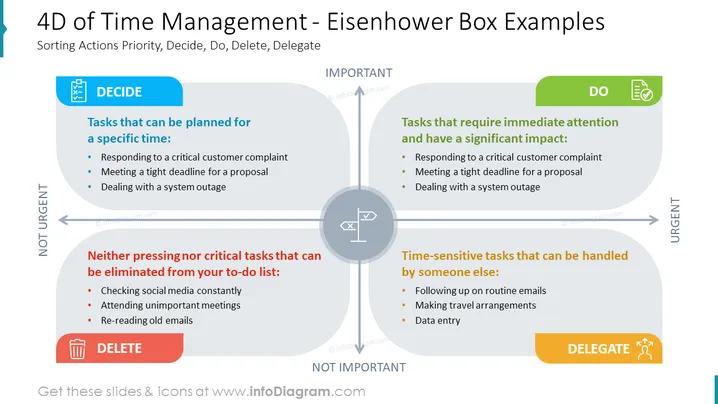
The slide is about the Eisenhower Box, a time management framework that categorizes tasks based on their urgency and importance using four quadrants: Decide, Do, Delete, and Delegate. "Decide" encompasses tasks that can be planned for a specific time, like responding to critical complaints, meeting deadlines, or system outages. "Do" refers to urgent and important tasks, such as timely responses to critical situations. "Delete" covers tasks that aren't pressing or critical and can be eliminated, like checking social media or attending unimportant meetings. "Delegate" involves tasks that are time-sensitive but can be handled by others, including routine emails, travel arrangements, and data entry.
The slide has a clean, professional appearance, with a balanced use of color and clear visual delineation of categories. The icons and colored quadrants make it visually engaging and easy to understand.



